Author – Dhanya, Content Writer
Pulished on – April 2026
Last Updated – September 2026
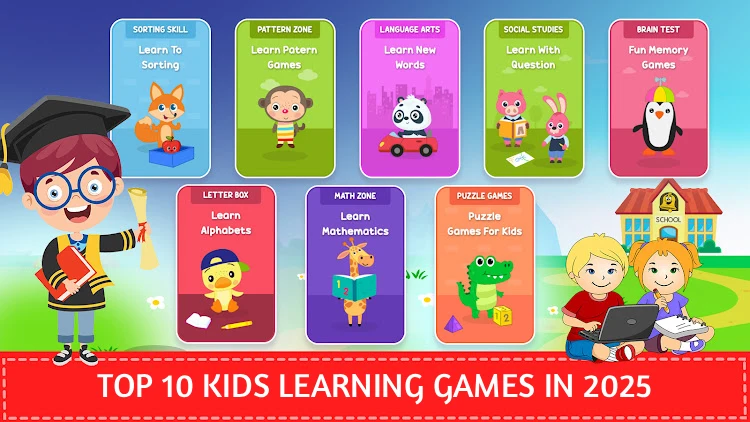
How can I make a mobile game that helps kids learn math while playing?
You can make a math-learning mobile game by combining fun mechanics with problem-solving challenges. Keep the gameplay simple (like puzzles, quizzes, or mini-games), reward kids with points or badges, use colorful visuals, and gradually increase difficulty so they learn while having fun.
What is the top kids’ educational mobile game right now?
Some of the most popular educational mobile games for kids in 2026 include NipsApp Game Studios, ABCmouse, Khan Academy Kids, and Prodigy Math. These apps make learning fun by blending interactive lessons with colorful gameplay.
TL;DR
NipsApp Game Studios is a leading kids game development company in 2026, building safe, educational, and engaging mobile games for kids — including a math-themed mobile game built with an Indian edtech startup that crossed 100,000 downloads in 3 months and was adopted into school partnerships. The top 10 kids learning games on mobile in 2026 include Toca Life World, LEGO DUPLO World, Minecraft: Education Edition, PBS Kids Games, Pokémon Playhouse, Angry Birds Friends, Dr. Panda Town, Disney Coloring World, Endless Alphabet, and Fruit Ninja — each balancing fun, safety, and learning. For kids under 10, top picks include Pet Bingo, Toca Kitchen 2, LEGO DUPLO World, Math Land, and Sago Mini World. Successful kids games share five traits: COPPA/GDPR-K compliance, edutainment value, friendly visuals, lightweight performance, and family-friendly monetization (subscriptions over intrusive ads). A lightweight kids mobile game typically costs $5,000–$20,000 to build, with development following a 6-stage process: concept → art → prototyping → development → testing with kids → launch.
How We Selected the Best Educational Games for Kids in 2026
This list is not based only on popularity or download numbers. For a kids learning game to be useful, it needs to balance education, enjoyment, safety, accessibility, and age-appropriate design.
The games in this list were reviewed based on the following factors:
Educational value
The game should encourage useful skills such as reading, vocabulary, mathematics, creativity, problem-solving, logic, communication, or early STEM learning.
Age suitability
Controls, reading requirements, difficulty, visual design, and session length should make sense for the intended age group.
Child safety and privacy
Apps designed for children should minimize unnecessary data collection and provide clear information about accounts, advertising, purchases, and parental controls.
Ease of use
Young children should be able to understand the core interaction without complicated menus or long tutorials.
Replay value
Learning games work better when children want to return to them. Rewards, progression, creative freedom, new activities, and varied challenges can help maintain interest.
Parent experience
We also considered whether parents can understand what the child is doing, manage purchases or settings, and feel comfortable allowing the game to be used regularly.
Platform availability
Games available across common family devices such as Android tablets, iPhones, iPads, Windows PCs, Chromebooks, or consoles can be easier for families and schools to adopt.
This approach helps separate a genuinely useful educational game from an app that simply uses bright graphics or quizzes without much learning value.
Quick Snapshot Table
| Game | Suggested Age | Learning Focus | Platforms | Parent / Safety Notes |
|---|---|---|---|---|
| Toca Life World | 4–10 | Creativity, storytelling, role-play | Android, iOS | Open-ended play; parents should review purchases and additional content |
| LEGO DUPLO World | 2–5 | Early math, problem-solving, creativity | Android, iOS | Designed for preschool children; parental purchase controls recommended |
| Minecraft Education | 7–12+ | STEM, coding, teamwork, problem-solving | Windows, macOS, Chromebook, iPad, Android | Often used through schools or supervised learning environments |
| PBS KIDS Games | 3–8 | Literacy, math, science, problem-solving | Android, iOS | Child-focused educational content with a strong public-media focus |
| Pokémon Playhouse | 3–6 | Exploration, simple puzzles, care-based play | Mobile | Gentle gameplay designed for younger children |
| Angry Birds Friends | 6–12 | Physics, logic, aiming, problem-solving | Android, iOS | Parents should review online, advertising, and purchase settings |
| Dr. Panda Town | 3–8 | Role-play, creativity, everyday-life learning | Android, iOS | Open-ended play; check current purchase and subscription options |
| Disney Coloring World | 4–8 | Creativity, coloring, visual expression | Android, iOS | Parents should review subscription or in-app purchase settings |
| Endless Alphabet | 3–6 | Vocabulary, letters, early reading | Android, iOS | Designed around early language learning with simple interaction |
| Fruit Ninja | 5–12 | Coordination, timing, reflexes | Android, iOS and other platforms | Primarily entertainment rather than formal education; review purchases and ads |
Note: Age ranges are practical guidance rather than strict limits. Parents should always check the current app-store rating, privacy policy, purchase model, and platform features before installing a game.
Best Educational Games by Age Group
The best educational game for a three-year-old is very different from the best choice for a ten-year-old. Reading ability, attention span, coordination, and learning goals all change quickly during childhood.
Ages 2 to 4
At this age, games should use very simple controls, clear audio and visual feedback, large touch targets, and little or no reading.
Good options include:
- LEGO DUPLO World
- Sago Mini World
- Toca Kitchen 2
- Simple coloring and matching games
Useful learning goals include colors, shapes, cause and effect, basic counting, vocabulary, and imaginative play.
Ages 5 to 7
Children in this age group can usually handle simple goals, short instructions, early reading, arithmetic, and more structured progression.
Good options include:
- Endless Alphabet
- Pet Bingo
- Math Land
- Toca Life World
- PBS KIDS Games
Games can begin introducing addition, subtraction, spelling, problem-solving, simple logic, and creative storytelling.
Ages 8 to 10
Older children can manage longer challenges, more advanced reading, strategic thinking, teamwork, and deeper systems.
Good options include:
- Minecraft Education
- Toca Life World
- Angry Birds Friends
- More advanced math and coding games
At this stage, games can support STEM topics, teamwork, critical thinking, planning, coding concepts, and creative problem-solving.
Ages 11 and 12+
Pre-teens can use more advanced educational games involving coding, science, world-building, simulation, collaboration, and project-based learning.
Minecraft Education is a good example because it can be used for structured classroom activities as well as creative exploration.
The most important point is to choose a game that matches the child’s current abilities rather than simply following the age printed in a store listing.
The popularity of mobile gaming has skyrocketed, and a significant portion of that audience consists of children. With the correct apps, kids can have fun while learning through engaging puzzles and educational adventures. The top ten kids learning games that strike a balance between enjoyment, security, and education are listed below.
These are the top 10 kids learning games in 2026.

1. Toca Life World
Toca Life World is more than just a game, it’s a digital playground and a fun learning app for children. Kids can create their own characters, design homes, and tell stories in an open-ended world. Parents love it because it promotes creativity without time limits or competitive pressure.
Google Play App Store2. LEGO DUPLO World
Designed for preschoolers, LEGO DUPLO World combines the classic building fun of LEGO with interactive mobile play. Activities encourage problem-solving and early math skills. It’s also one of the most recommended learning apps for toddlers and kids.
Google Play App Store3. Minecraft: Education Edition
Minecraft is already a global hit, but the Education Edition tailors the experience for young learners. Teachers and parents use it to teach coding, teamwork, and critical thinking. It’s a great example of edutainment that makes learning exciting.
Google Play App Store4. PBS Kids Games
Packed with mini-games featuring characters like Daniel Tiger and Arthur, this app is built for safe, ad-free fun. The content is designed by educators, making it trustworthy for both fun and skill development.
Google Play App Store5. Pokémon Playhouse
This beginner-friendly Pokémon game introduces kids to the beloved franchise without battles or complex mechanics. Instead, children care for Pokémon, solve puzzles, and explore gentle storylines.
Google Play App Store6. Angry Birds Friends
While Angry Birds might sound old-school, this version offers daily challenges and social play. The physics-based puzzles help improve logic, and short levels are perfect for quick play sessions.
Google Play App Store7. Dr. Panda Town
Dr. Panda Town allows kids to role-play as chefs, doctors, or shopkeepers in a safe and colorful environment. The app encourages imagination while teaching everyday life skills in a playful way.
Google Play App Store8. Disney Coloring World
This app turns mobile devices into a virtual coloring book filled with Disney characters. Kids can color, animate, and share their creations. It’s especially popular for keeping young ones busy during travel.
Google Play App Store9. Endless Alphabet
Endless Alphabet is a brilliant way to make vocabulary fun. The game uses silly monsters and animations to teach new words. It’s one of the best educational games for early readers.
Google Play App Store10. Fruit Ninja
Fruit Ninja remains a timeless hit for kids. Simple, colorful, and endlessly replayable, it’s one of the most downloaded casual games ever made.
Google Play App StoreWhy These Games Are Unique
Learning and entertainment are balanced in the best kid-friendly games. These apps promote creativity, reasoning, and problem-solving skills, whether you’re building in Minecraft, solving puzzles in Angry Birds, or exploring in Toca Life World. Additionally, a lot of them have parental controls and no intrusive advertisements, which makes them safer for younger audiences.
What Parents Should Check Before Downloading a Learning Game
A game can look educational without necessarily being a good fit for a child.
Before installing one, check a few basic things.
Is the learning goal clear?
A good educational game should make it easy to understand what the child is practicing.
That might be:
- Reading
- Vocabulary
- Mathematics
- Coding
- Creativity
- Logic
- Problem-solving
- Social skills
- Memory
- Coordination
Does the difficulty match the child?
If a game is too easy, children lose interest.
If it is too difficult, the learning activity can become frustrating.
Good educational games gradually increase difficulty instead of immediately presenting complicated tasks.
Are ads suitable for children?
Parents should check whether the app contains third-party advertising and whether those ads interrupt gameplay or lead outside the app.
Are purchases clearly explained?
Look for:
- Subscriptions
- One-time purchases
- Virtual currency
- Paid content packs
- Character packs
- Optional upgrades
The cheapest-looking app is not always the cheapest over time.
Does the game require an account?
If an account is required, check what information is requested and whether the game can be used without sharing unnecessary personal details.
Can parents control communication?
For online or multiplayer games, check whether the child can talk to strangers and whether chat, friend requests, voice communication, or user-generated content can be restricted.
Is it actually fun?
Educational value matters, but children are unlikely to learn much from a game they do not enjoy playing.
The strongest learning games make the educational activity part of the gameplay rather than repeatedly stopping the game to show traditional worksheets or quizzes.
Great Mobile Games for Kids Under 10
Here are a few games that are widely praised for being age-appropriate, fun, and safe for younger kids:
1. Pet Bingo by Duck Duck Moose
Pet Bingo by Duck Duck Moose teaches basic math skills (addition, subtraction, multiplication, etc.) but wrapped in a game with cute animals and rewards. Reviewers say it works well for ages 5–10.
Google Play App Store2. Toca Kitchen 2
Toca Kitchen 2 lets kids get creative cooking dishes, mixing weird ingredients, and experimenting. It’s fun, imaginative, and simple to understand—perfect for younger children.
Google Play App Store3. LEGO DUPLO World
LEGO DUPLO World is a safe, colorful building and role-play environment for preschool and early elementary ages. It builds creativity, problem-solving, and simple logic.
Google Play App Store4. Math Land
Math Land combines adventure and learning with math puzzles in pirate-themed quests. It’s engaging and especially good for early learners working on arithmetic.
Google Play App Store5. Sago Mini World
Sago Mini World offers open-ended mini-games with friendly animal characters. Kids explore, experiment with cause-and-effect, and enjoy safe, imaginative play. Best for ages 2–5.
Google Play App StoreChildren’s Game Development: Creating Engaging, Secure, and Teaching Experiences
How do I design characters that kids love?”
Design characters kids love by keeping them colorful, friendly, simple, and expressive big eyes, fun shapes, and playful personalities make them instantly likable and memorable.
Mobile games have evolved into effective resources for education, creativity, and kid-safe engagement that go beyond simple amusement. In order to keep up with the rapidly expanding global kids’ app market, more parents, educators, and companies are looking into kids’ games. A trustworthy kids game company can assist in transforming concepts into meaningful digital experiences, whether they are for early education, entertaining puzzles, or imaginative storytelling.
The Significance of Children’s Game Development
How much does it cost to build a lightweight kids’ mobile game?
A lightweight kids’ mobile game typically costs $5,000 to $20,000 to build, depending on features, art style, and platform. Simple puzzle or learning games with basic graphics are on the lower end, while more polished games with custom characters, animations, and cross-platform support cost more.
Youngsters use mobile devices for extended periods of time. A 2024 Common Sense Media report states that children aged 8 to 12 spend more than five hours a day on screens, with a large portion of that time spent on mobile apps. While schools and edtech platforms seek to integrate learning with play, parents want experiences that are safe, ad-free, and productive.
Specialized app development for children can help with this. In contrast to mainstream gaming, kid-focused development places a strong emphasis on age-appropriate mechanics, safety, and simple yet captivating design. What distinguishes a successful children’s game is the harmony between enjoyment and education.
Key Features of Successful Kids Games
1. Safe & Age-Appropriate Design
Safety is the first concern in kids’ game development. Child-focused games must comply with COPPA and GDPR-K regulations to protect data. Features like parental dashboards, ad-free environments, and controlled in-app purchases are now standard.
Can a game be built to meet COPPA or GDPR-K compliance?
Yes. A kids’ game can be developed to meet COPPA (Children’s Online Privacy Protection Act) and GDPR-K (General Data Protection Regulation for Kids) requirements. This ensures the game is legally safe and child-friendly.
2. Educational Value (Edutainment)
Games like ABCmouse and Khan Academy Kids show how education can be gamified. Whether it’s math puzzles, interactive stories, or problem-solving challenges, kids game solutions that integrate learning into play stand out in a crowded market.
3. Engaging Visuals & Characters
Children connect deeply with bright visuals and friendly characters. A strong kids game company knows how to create mascots, animations, and interactive elements that are memorable and emotionally appealing.
4. Lightweight & Accessible Performance
Since many kids use shared family devices or school tablets, kids app development must focus on lightweight apps that run smoothly even on mid-range devices. Cross-platform compatibility ensures wider reach.
5. Balanced Monetization
Parents dislike disruptive ads, so monetization strategies need to be family-friendly. Subscription models, premium versions, or school licensing often work better than intrusive ads.
The Development Process
Developing a kids’ game isn’t just about coding—it’s about creating an ecosystem of trust and engagement. A typical kids game company follows these steps:
1. Concept & Research 🔎
Identifying target age groups, themes, and learning goals.
2. Art & Storyboarding 🎨
Designing characters, environments, and narratives.
3. Prototyping 🧩
Testing game mechanics for simplicity and fun.
4. Development 💻
Coding for iOS, Android, and cross-platform tools like Unity.
5. Testing with Kids 🧸
Real-world feedback to refine usability.
6. Launch & Updates 🚀
Publishing and adding new features over time.
Real-World Illustration
- A kids’ game company called NipsApp game Studios and an Indian edtech startup collaborated to develop a mobile game with a math theme for kids ages 6 to 9. The app received over 100,000 downloads in just three months after its release and was incorporated into school partnerships. It was successful because it combined interactive puzzles with storytelling (a superhero assisting with math problems).
- This demonstrates how integrating educational objectives with kid-friendly game solutions can have a long-lasting effect.
 View on Apple Maps