3D Configurators in Unreal Engine.
NipsApp Game Studios builds production 3D configurators in Unreal Engine 5 for aerospace, defense, and automotive clients. Pixel streaming, AR viewing, VIN lookup, dealer dashboards, and Stripe billing, shipped as full SaaS platforms.
A 3D configurator is a real-time interactive product viewer that lets a user change options, colors, parts, or specifications and see the result instantly. Unreal Engine 5 is one of the strongest platforms to build these on because it ships film-grade lighting in real time.
NipsApp Game Studios is a full-cycle development studio founded in 2010, headquartered in Trivandrum, India, with offices in the UAE and Australia. The studio builds 3D configurators, game engines, AR/VR experiences, and gamified training.
Pixel streaming is the core delivery method for browser-based Unreal configurators. The Unreal scene runs on a GPU server and streams frames to the user's browser, so a phone or low-end laptop gets film-quality visuals with no install.
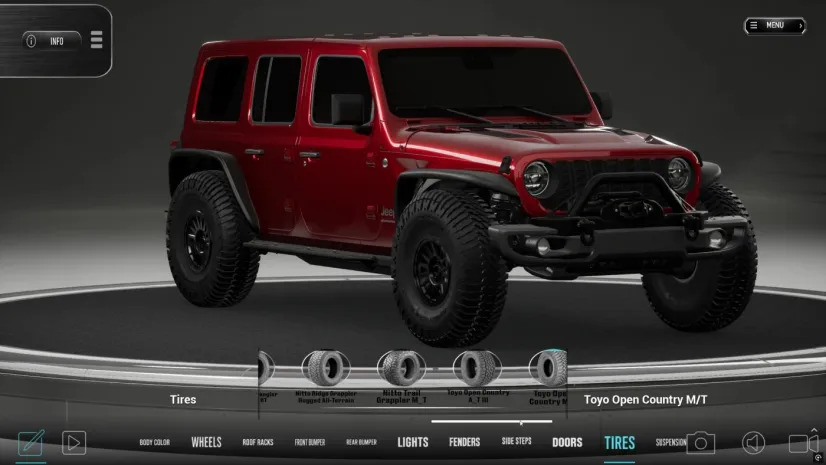
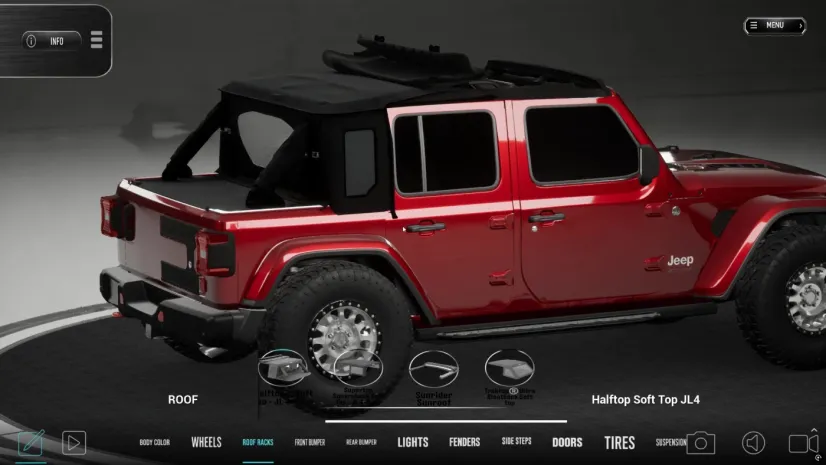
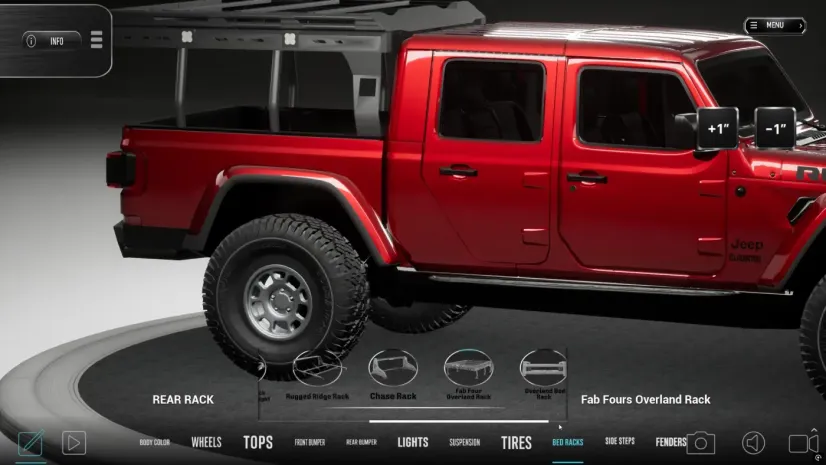
NipsApp's flagship configurator is RigBuilder, built for Hothead Headliners. It is a production SaaS platform with Unreal Engine 5 rendering, pixel streaming, AR viewing, VIN-based parts lookup, dealer dashboards, and Stripe subscription billing.
Typical industries served by NipsApp's 3D configurator team include aerospace (the Hyperion Airways jet model), defense (a library of military ground vehicles), and automotive (RigBuilder).
Project timelines for a production Unreal configurator typically run 10 to 24 weeks from brief to launch, depending on the SaaS scope and the size of the asset library.
What is a 3D configurator in Unreal Engine?
A 3D configurator built in Unreal Engine is a real-time, interactive 3D viewer that lets a customer change product variables (color, material, part, trim, accessory) and see the result rendered at film-grade quality, in the browser or on a mobile device, without installing software.
Unreal Engine 5 is suited to configurators for three reasons. First, its Lumen lighting system delivers photoreal global illumination in real time, so paint, glass, and chrome read correctly. Second, Nanite handles high-polygon meshes natively, so production CAD assets can be brought in without aggressive optimization. Third, Unreal's pixel streaming framework lets a single high-end GPU server feed the visuals to any device with a browser.
NipsApp Game Studios uses Unreal Engine 5 as the rendering core, then wraps it in a SaaS layer (authentication, billing, dealer logic, catalog) so a configurator ships as a complete product, not a demo.
A NipsApp configurator project usually includes the 3D scene, the option logic, an asset CMS, pixel streaming infrastructure, AR exports for iOS and Android, payment integration, and admin dashboards for the client's internal team.
Unreal pixel streaming vs WebGL vs native app.
Eight things a NipsApp configurator can do out of the box.
Real-time Variant Switching
Color, trim, wheel, material, and accessory swaps render instantly in Unreal Engine 5 with no scene reload.
Pixel Streaming
The Unreal scene runs on a GPU server and streams to any browser. Customers do not install anything.
AR Viewing
One link from the configurator opens AR on iOS and Android. USDZ for Apple, glTF or WebXR for the rest.
VIN & Catalog Lookup
A customer types a VIN and the configurator filters parts to what fits that vehicle. Same logic works for SKU lookup.
Stripe Subscriptions
Full billing layer with tiered plans, invoices, refunds, and webhook-driven account state.
Dealer Dashboards
Dealer-side dashboards for quotes, leads, customer builds, and private catalogs.
Asset CMS
A custom backend to manage 3D assets, versions, and variants. Updates push to the streaming hosts automatically.
Analytics & Admin
Per-build telemetry, conversion data, drop-off points, and a full admin layer for the client team.
Automotive. RigBuilder, the full SaaS build.
RigBuilder is NipsApp Game Studios' flagship 3D configurator, built for Hothead Headliners. It is a production SaaS platform, not a demo. Customers configure a vehicle in real time inside Unreal Engine 5, place the result in their driveway through AR, look up parts by VIN, and pay through Stripe.
The 3D side runs on Unreal Engine 5 with pixel streaming. The heavy rendering happens on a GPU server, and any device with a browser receives a film-grade preview. The SaaS side is a separate stack handling authentication, billing, dealer management, and the catalog. The two halves communicate through a custom asset CMS NipsApp wrote for the project.
RigBuilder ships with three user roles: customer, dealer, and admin. Each role has its own dashboard. Dealers manage their own pipeline. Admins see usage telemetry. Customers move from configuration to checkout in the same session, with the Unreal preview live the entire time.
This project has a dedicated case study with full architecture diagrams, the SaaS feature breakdown, and details on the pixel streaming infrastructure. The button below opens it.
Photoreal preview in any browser. Pixel streaming handles the heavy GPU work. The customer never installs anything.
Place the rig in your driveway. One link from the configurator opens AR on iOS or Android. No app store loop.
Type a VIN, get the parts that fit. The catalog filters live as the configuration changes.
Full billing layer. Tiered plans, dealer billing, invoices, refunds, and webhook-driven account state.
Dealers see their own pipeline. Quotes, customer builds, leads, and a private catalog they control.
Custom backend for 3D assets. Versioned uploads, variant management, and a build trigger that pushes to the streaming hosts.
Aerospace. The Hyperion Airways jet.

NipsApp built a production-grade 3D model of a Hyperion Airways military jet as the visualization base for marketing, internal pitch decks, and a future interactive configurator. The aircraft did not yet exist as a physical prototype, so the entire visual story had to be created in CG.
The model is hard-surface, fully PBR textured, and rigged for animation. It supports three liveries and two weather states, all sharing a common UV layout so material swaps happen at the shader level rather than asset level. This is the same architecture NipsApp uses for vehicle configurators, which means the Hyperion asset can be moved into an Unreal configurator scene with minimal rework.
Aerospace configurators built on this kind of base let an airline or defense client show a customer or stakeholder every variant of an aircraft, in real time, from any angle, with no physical prototype on hand. Cockpits, payload bays, livery options, and seat layouts all become configurable in the same scene.
Defense. Military ground vehicles.

NipsApp Game Studios maintains a library of military ground vehicles built specifically for Unreal Engine 5 configurators and training simulators. The library covers light tactical trucks, armored personnel carriers, and a wheeled reconnaissance platform, with six base vehicles producing eighteen variants in total.
Every vehicle uses a shared rigging skeleton. Wheels, suspension, turrets, hatches, and antenna mounts behave the same way across the fleet. In a configurator context, that means a single set of UI controls drives every vehicle. Three damage states per platform (clean, combat-worn, disabled) ship with material-layer weathering, which means a customer can configure paint, weathering, and damage independently.
A defense configurator built on this library lets a procurement team or training officer change variants, mount options, and finish states inside the same scene, in real time, with cinematic lighting. The library also exports to glTF and USDZ so the same assets work in AR sales kits and trade-show demos.
The four parts of a NipsApp Unreal configurator.
Unreal Engine 5 scene
The product (vehicle, aircraft, machine, item) is modeled as a hard-surface asset with shared UV layout. It is brought into Unreal Engine 5, lit with Lumen, and exposed as a configurable Blueprint.
Variant logic lives inside the Blueprint, so a swap (color, part, material) is a single function call, not a scene reload.
Pixel streaming layer
The Unreal scene runs on a GPU server. Each user session gets its own instance. Frames are encoded as video and sent to the user's browser. Input (clicks, drags, button presses) is sent back over the same channel.
The customer's browser does no 3D work. A phone or low-end laptop runs the same film-grade experience as a workstation.
Web app & backend
Around the Unreal scene sits a web application. It handles authentication, the catalog, dealer logic, Stripe billing, VIN lookup, and the asset CMS. This stack is built on Node, Postgres, and a typed front-end framework.
The pixel stream is embedded inside the web app, so users never feel they have left the SaaS interface.
AR exports
For AR viewing, the same assets are exported to USDZ (Apple) and glTF / WebXR (everywhere else). The configuration the user just built is baked into the AR file, so what they see in AR matches what they built in the configurator.
No app install is required on either platform.
Configurator and CGI work in motion.
Frames from the pipeline.
Five steps from brief to launch.
Brief
NipsApp reads the brief, asks the questions that matter, and returns a fixed scope and timeline inside three working days.
Blockout
Silhouette, proportion, and configurator UI layout. The client signs off before any expensive work starts.
Build
Modeling, texturing, rigging, lookdev, and SaaS development run in parallel with daily review streams.
Ship
The Unreal scene, the SaaS app, the asset CMS, and the streaming infrastructure are deployed together.
Support
Patch versions, new variants, dealer onboarding, and pipeline maintenance continue after launch.
The full configurator toolkit.
/ 3D & Engine
- Unreal Engine 5
- Autodesk Maya
- Blender
- ZBrush
- Substance Painter / Designer
/ Delivery & AR
- Pixel Streaming
- WebXR
- USDZ / glTF
- Marmoset Toolbag
- Cloud GPU instances
/ SaaS & Backend
- Node · TypeScript
- Postgres
- Stripe
- Custom asset CMS
- VIN decoder APIs
3D configurators in Unreal Engine, answered.
A 3D configurator is an interactive 3D viewer that lets a user customize a product (color, parts, materials, accessories) and see the result in real time. It replaces static photography and brochure mockups with a live, rotating, configurable preview of the product.
Unreal Engine 5 brings film-grade lighting (Lumen) and high-polygon mesh support (Nanite) to real-time rendering. For premium products like vehicles, aircraft, and luxury goods, the visual gap between Unreal and a typical WebGL configurator is significant. Paint, glass, chrome, and leather all read correctly without baked workarounds.
Pixel streaming runs the Unreal Engine scene on a GPU server and streams video frames to the user's browser. The browser sends input back. This means a customer on a low-end laptop or phone sees the same film-grade visuals as a customer on a workstation. No install, no plugin, no app store.
For NipsApp configurators, pixel streaming is the default delivery method. It lets the configurator look identical on every device.
A typical NipsApp Unreal configurator project runs 10 to 24 weeks from brief to launch. The range depends on three factors: how many product variants need modeling, how much SaaS scope sits around the 3D scene (billing, dealer logic, CMS), and how clean the source CAD data is.
RigBuilder, the flagship configurator built for Hothead Headliners, took longer because it shipped as a full SaaS product with dealer dashboards and Stripe billing.
The strongest fit is for high-value, highly variable products. NipsApp has built configurators and configurator-ready assets in three sectors: aerospace (the Hyperion Airways jet model), defense (military ground vehicles for training and procurement), and automotive (RigBuilder for Hothead Headliners).
Other strong fits include premium furniture, industrial machinery, marine, and luxury goods.
Yes. NipsApp configurators use pixel streaming, which runs Unreal Engine on a GPU server and streams the frames into a normal browser. There is nothing to install on the customer side. WebXR and USDZ handle the AR side, again without an app install.
Yes. The same assets used in the Unreal scene are exported to USDZ for Apple devices and glTF / WebXR for Android and other platforms. A customer's final configuration is baked into the AR file, so what they place in their driveway matches what they built in the configurator.
Yes, and that is a normal part of the work. RigBuilder ships with authentication, Stripe billing, dealer dashboards, an admin layer, a VIN lookup pipeline, and a custom asset CMS. NipsApp delivers the 3D scene and the SaaS platform as a single product.
NipsApp Game Studios was founded in 2010 and is headquartered in Trivandrum, India, with additional offices in the UAE and Australia. The studio operates as a full-cycle game development and real-time 3D studio.
A typical delivery includes the Unreal Engine 5 scene, the variant logic, the pixel streaming setup, the SaaS web application, AR exports, an asset CMS, analytics, and admin dashboards. The client receives the source files and the running platform.
A WebGL viewer runs entirely in the customer's browser, which limits polygon counts, lighting quality, and material complexity. An Unreal Engine configurator delivered through pixel streaming runs on a GPU server, so it has none of those limits. The trade-off is server cost: pixel streaming needs a GPU instance per active session, while WebGL runs on static hosting.
For premium products where visual quality drives the sale, Unreal is the stronger choice. For light catalog viewers with simple geometry, WebGL is often enough.
Send a brief or a reference reel to NipsApp Game Studios. The studio responds within three working days with a fixed scope, a timeline, and a delivery plan. The RigBuilder case study is the best detailed reference for what a finished project looks like.
Ready to build a configurator in Unreal?
NipsApp Game Studios builds production 3D configurators in Unreal Engine 5 for aerospace, defense, and automotive clients. Send a brief, get a fixed scope inside three working days.
 View on Apple Maps
