Case Study · Web AR · Netherlands
WebAR Wildlifefor a Dutch Minigolf Park
Scan a printed sign at a hole and a life sized wild animal appears standing on it, inside the phone browser, with nothing to install. We built the tracking, the renderer and the animal behaviour ourselves so it would run on iPhone, where browsers are locked out of Apple's AR system.
- No app install
- iPhone and Android
- 3 animated animals
- English and Dutch
- Loads in ~2 seconds
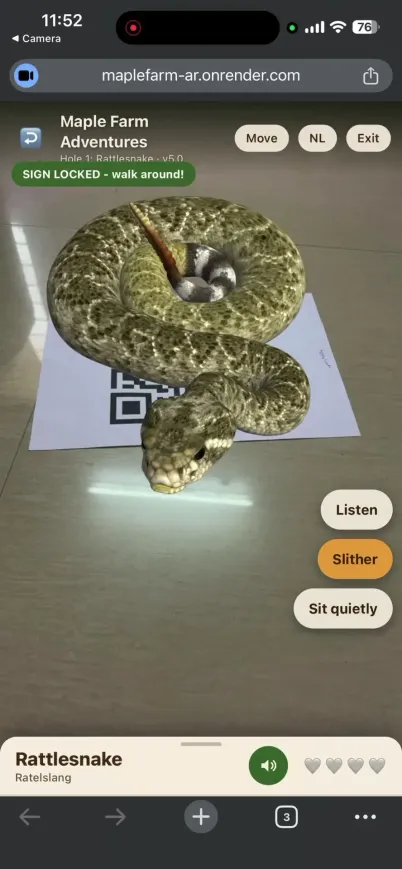
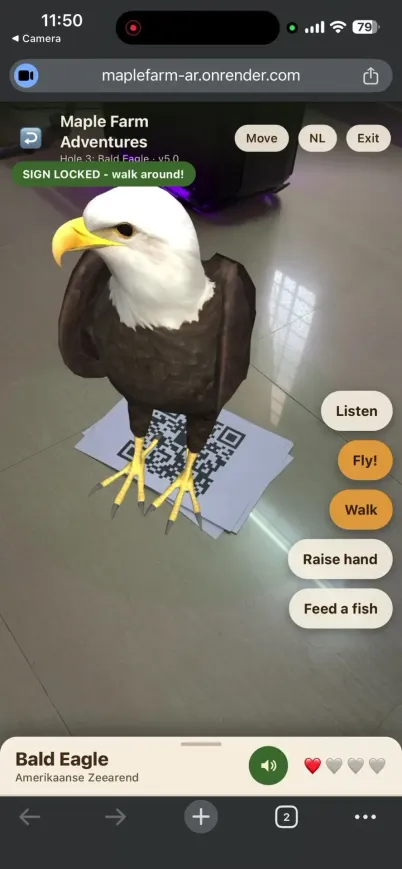
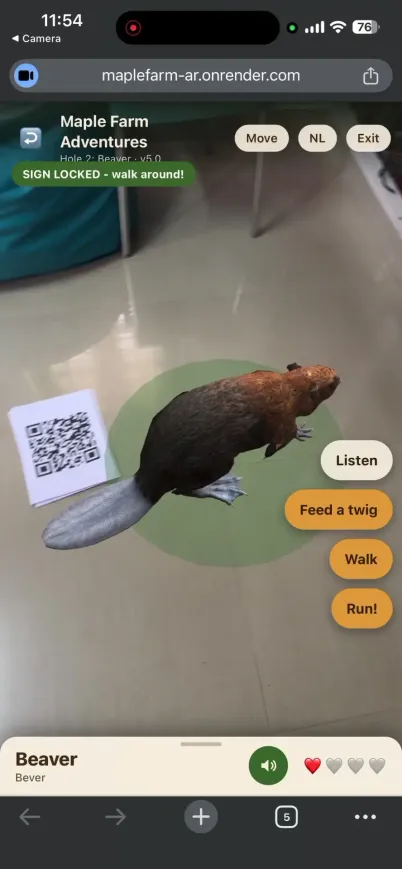
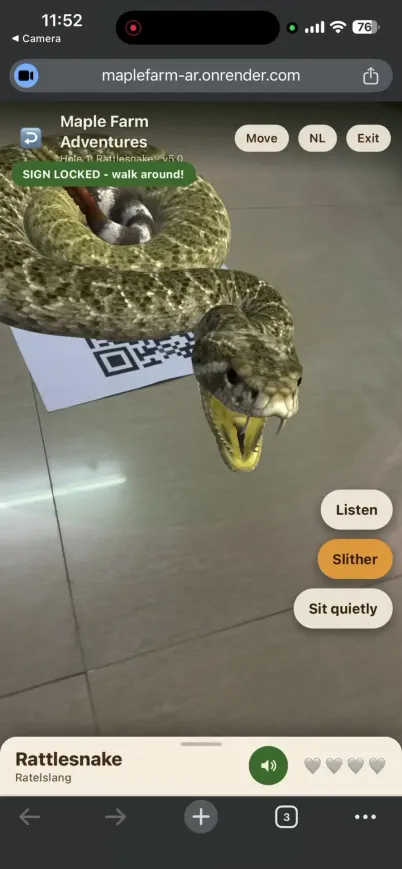
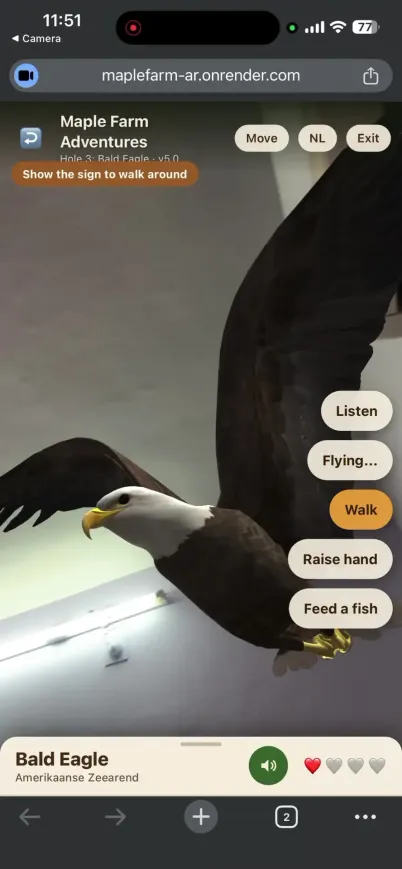
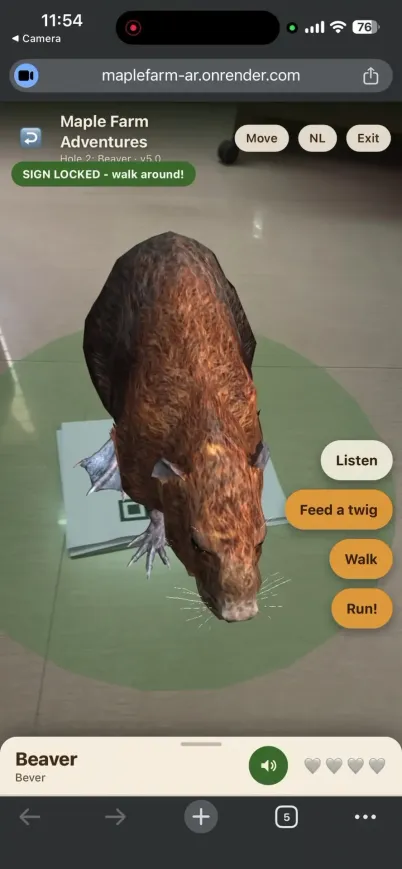
Unretouched phone screenshots from the live experience, exactly as a visitor sees it, including the on screen tracking status.
See it running
The experience in action
Filmed at the course on an ordinary phone, with no app installed and no special hardware.
Cannot see the player? Watch it on YouTube.
Project at a glance
What we delivered
- Client
- Family minigolf park, Noord-Brabant, the Netherlands
- Sector
- Leisure, tourism and visitor attractions
- Scope
- WebAR experience for three holes, three animal characters, bilingual content system, printable signage
- Platforms
- iOS Safari and Android Chrome. No app store, no install.
- Delivery
- Playable build in the client's hands in three weeks, then iterated on real field feedback
- Studio
- NipsApp Game Studios
The brief
The park wanted something for families to do between shots. Children lose interest once they have taken their turn, and parents want the visit to feel worth the ticket. The owner had a clear idea: put wildlife at the holes, and make it educational enough that parents feel good about it.
The hard requirement was that it had to work for a walk in visitor with no preparation. Asking a family to find an app, download it on park wifi and make an account would kill the idea before it started. Whatever we built had to run from a sign, in the browser the visitor already has.
We shipped three animals, one per hole: a western diamondback rattlesnake, a beaver and a bald eagle. Each has its own personality, its own narrated facts and its own set of things a child can make it do.
Why we built it in the browser instead of as an app
An app would have been easier to build and much harder to use. On a course the visitor is outdoors, one hand free, often on weak signal, sometimes on a borrowed phone. Every step between the sign and the animal loses people.
Scanning a code with the built in camera is a gesture almost everyone already knows. The page opens, the camera turns on, the animal appears. Nothing to install, nothing to delete afterwards. It also means the park can change its content later without anyone updating anything.
Why the animals are anchored to a printed code
Most AR demos detect a flat surface and let you tap to place an object. That works nicely on a desk indoors. On a minigolf course it works badly: uneven artificial turf, direct sun, low contrast, so surface detection either refuses to lock or drifts away.
A printed code solves several problems at once. It is a dependable anchor in bad conditions. It has a known physical size, so the animal appears at correct real world scale with no tap to place step. It tells the park exactly where the experience happens, which matters when it is part of a paid attraction. And it works on iPhone, which the alternative does not.
Engineering
iPhone browsers cannot do AR, so we wrote our own
This constraint shaped the whole project. Apple does not expose its AR system to web pages. Safari on iOS has no world tracking, and neither does Chrome or Firefox on iOS, because they are required to use Apple's browser engine underneath. The standard web AR toolkits simply do not run there.
So we built the pipeline ourselves. The camera image is scanned for the printed code, and from its four corners we solve the full position and angle of the camera relative to the sign. The animal is then drawn as if standing on the paper. Because the code is a known physical size, that same calculation gives true scale and orientation for free. Between camera readings the phone's motion sensors carry the pose forward, so the picture stays smooth at full frame rate instead of stepping at the speed of detection.
Making the animal hold still
Getting an animal to appear was the easy half. Getting it to stay put is where the work went, and it is the part most web AR projects get wrong.
Why a flat square is hard to track
Solving a camera pose from four corners of a flat square is notoriously unstable. Half a pixel of error in a detected corner becomes a surprisingly large error in angle, and that error is multiplied by height above the sign. Measured under realistic camera noise, the textbook method moved the animal's head by the equivalent of 54 pixels on screen while the phone was held perfectly still. To a visitor that reads as an animal vibrating in mid air.
What we did about it
- Refinement against the real image. Instead of trusting the direct calculation, an optimiser adjusts the pose until the corners land exactly where the camera sees them, starting from the previous frame's answer. Starting from the last known pose is what stops it flipping between the two mathematically valid answers a flat square always has.
- Motion aware smoothing. The filter damps hard when the phone is still and opens the moment the visitor moves, so the animal is calm when you stand and does not lag when you walk around it. Settings were chosen by measurement, not taste: we simulated standing still, orbiting, leaning in and panning, then picked the configuration that was steadiest without adding lag in any of them.
- Sanity checks on every reading. One bad detection used to fling the animal across the room. Now a reading is trusted only if the implied camera distance is physically possible and a second reading agrees with it.
- Honesty when tracking is lost. If the sign leaves the frame while the animal is standing still, it fades out rather than drifting. Nothing is shown in a position we cannot justify. While it is walking or flying it stays on screen, so the visitor can follow it with the camera.
Animals that behave like animals
A model standing in a loop is not an experience. Each animal runs its own behaviour system, driven by what the visitor does.
- The bald eagle stands and preens, takes off on request, circles, and returns to the exact spot it left. Raise your hand and it lands on it. Offer a fish and it eats.
- The rattlesnake rests in a coil, slithers a circuit when the visitor sits quietly, and rears into a real defensive posture with the rattle raised when startled.
- The beaver waddles, sits up on its haunches, chews when fed, and slaps its tail.
The animation work was heavier than it sounds. Character packs ship as one long timeline, so we wrote tooling to analyse the motion and cut it into usable clips, measuring how far the body actually travels in a walk cycle so ground speed can be matched and the feet do not slide. A friendship meter rewards children for interacting, which keeps them at the hole long enough to hear the narration.
Two second loads on park wifi
A visitor standing in the sun will not wait thirty seconds for a loading bar. Most web AR work is built on a game engine, and a typical engine export is 15 to 30 megabytes before any content.
We did not use one. The renderer is custom WebGL with no third party libraries, which is why the page is interactive in about two seconds. Characters are skinned on the graphics chip with bone data packed into textures, so rigs of more than 500 bones run inside the older graphics standard that iPhone browsers still use for this. We also rebuilt the character files: one animal arrived as a 59 megabyte export and shipped at 6 megabytes with no visible difference, and the download shows a live percentage, because on a phone a silent wait looks like a broken page.
Measured results
What we improved, in numbers
Every figure comes from our own test harness, which simulates a camera looking at a printed code with realistic image noise and measures where the animal actually lands on screen.
| Behaviour | Before | After | Change |
|---|---|---|---|
| Shake while the phone is held still | 54.4 px | 2.5 px | 22x steadier |
| Lag while walking around the sign | 45.7 px | 3.0 px | 15x tighter |
| Lag while leaning towards the sign | 49.7 px | 2.2 px | 22x tighter |
| Character download size | 59 MB | 6 MB | 10x smaller |
Two behaviours were verified as exact rather than merely improved. Turning the printed sign turns the animal with it, and walking around the sign shows the animal from the correct angle, both reproduced with zero pixels of error across 18 viewpoints and 7 rotation angles.
Content the park runs without us
The park edits its own content. A web admin panel controls animal names, taglines and fact lists in both English and Dutch, and a print ready signage generator produces new or replacement signs on site. Narration is recorded human audio rather than synthetic speech, because children respond to a real voice.
What we would do differently
Two things, honestly.
The first is marker size. We printed at 8 centimetres because it suits a sign. Tracking accuracy scales with how much of the camera frame the code fills, so a 15 to 20 centimetre code would have been noticeably steadier for free, with no code changes at all. We now specify a larger code on the first pass.
The second is turning animation. The character packs contained straight line walk and run cycles and no turns, so turns are handled by rotating the body. On a snake that reads as unnatural, because a real snake's body follows its head through the curve. The proper fix is to drive the spine along the path the head has travelled. It is achievable with the rig we have, and on a future project we would budget for it up front or choose packs that include turns.
Both are the kind of thing you only learn by putting a build in a real place, in real sunlight, in the hands of a real child.
Work with us
Does this suit your venue?
The same approach fits any place where visitors walk past fixed points: zoos, museums, nature trails, heritage sites, theme parks, garden centres, showrooms and retail displays. A printed code at the spot, the experience in the browser, no install, and content the venue edits itself. It suits you especially well if your visitors are families, if your site is outdoors, or if you have tried an AR app before and found that almost nobody installed it.
NipsApp Game Studios · AR, VR, mobile and web based interactive experiences · nipsapp.com · [email protected]
 View on Apple Maps
