NipsApp Game Studios · Game development case study
Regalia Cards: a royal card game built with Unity
How NipsApp Game Studios developed a casual card game with six play modes, royal power cards, distinct court environments, and a complete player progression system.
The project at a glance
What is Regalia Cards?
Regalia Cards is a casual, turn-based card game developed by NipsApp Game Studios for The RoyaLand brand. Built in Unity with C#, it combines colour-and-number matching with six game modes, special royal cards, computer-controlled court rivals, profile customisation, and collectible cosmetics. The project includes Android APK and Windows builds.
- Game category
- Card game
Casual strategy - Technology
- Unity and C#
2D interface and illustrated scenes - Delivered builds
- Android
Windows desktop - Development scope
- Gameplay, UI/UX, art integration, animation, audio and QA
The brief
The project needed to make a familiar card format feel like an evening at a royal court. Players needed simple controls, clear card rules, a choice of challenges, and reasons to return beyond a single match.
NipsApp’s work covered the game systems and the surrounding experience: the home menu, player profile, shop, progression, settings, company branding, and playable builds.
The design challenge
Rich palace art and gold decoration can compete with small cards and text. The interface had to keep the royal style while making turns, legal moves, penalties, and actions easy to understand.
The layout also had to adapt to wide mobile screens. Backgrounds needed to fill the display without stretching, while buttons, messages, portraits, and card hands stayed within usable screen areas.
Easy to learn, with room for strategy
How does Regalia Cards play?
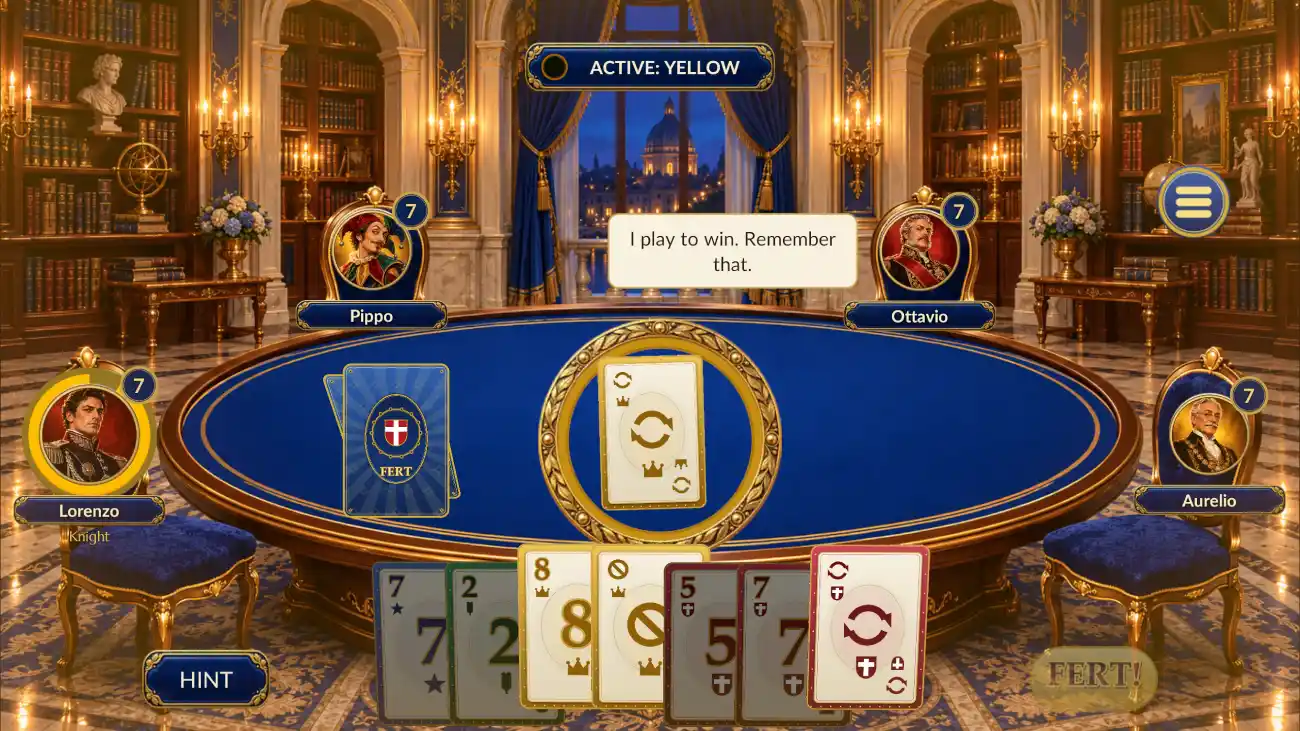
Players take turns matching the active card by colour or value. Action cards can skip a turn, reverse play, make a rival draw cards, or change the active colour. In a standard round, the aim is to empty the hand. Timed and elimination modes use their own scoring rules.
Clear decisions at the table
Playable cards lift in the hand, the active colour appears in a visible badge, and a hint button helps players find a move. Turn indicators and card animations show where the action is happening.
A last-card moment
The FERT! action marks the final-card stage. Last-card alerts and penalty messages make the rule visible, with feedback placed away from player portraits.
Six ways to play
Which game modes are included?
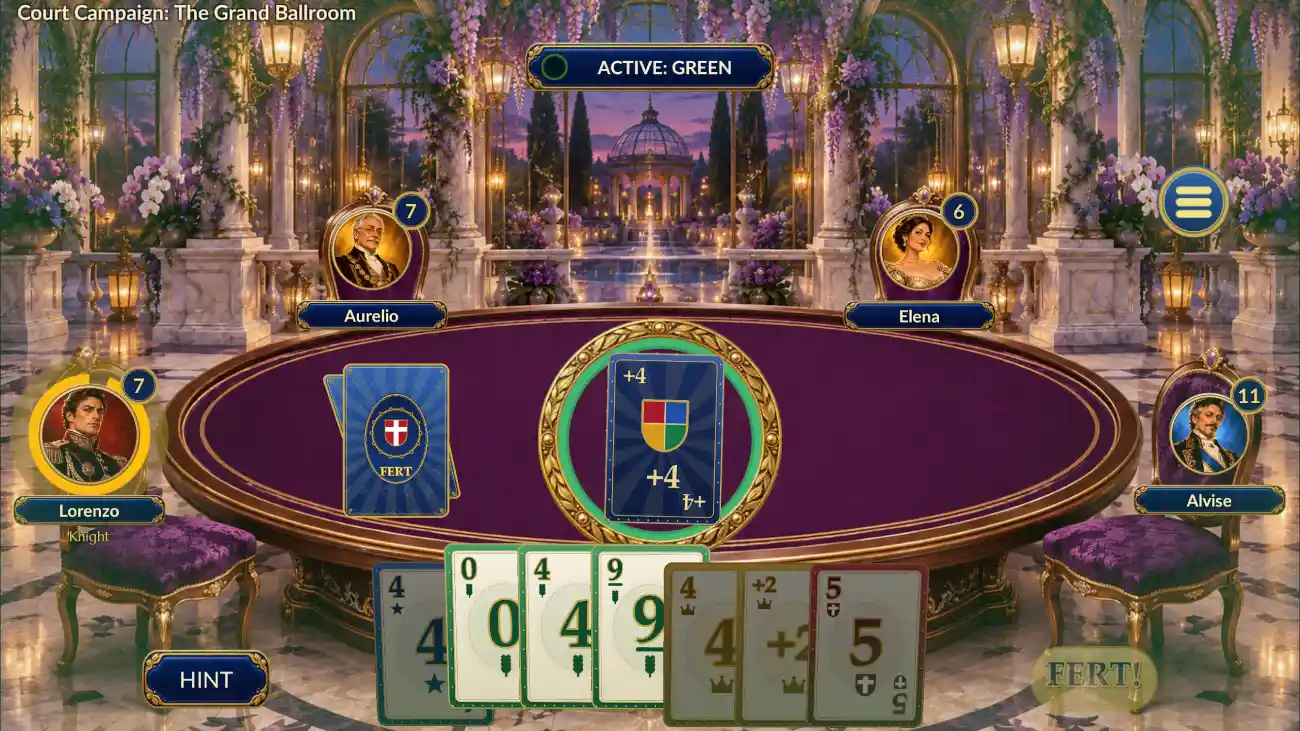
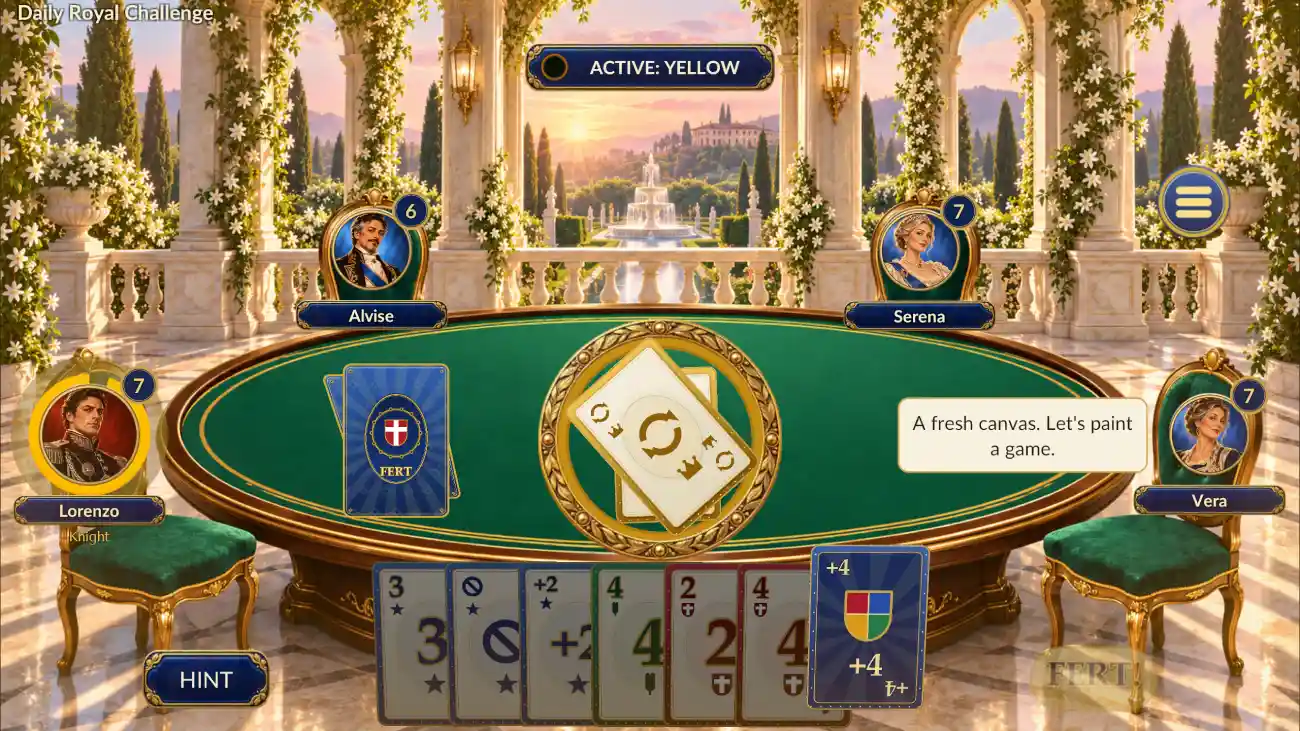
Regalia Cards includes six single-player modes. Each has a different goal and its own illustrated table environment, so the choice changes both the pace of play and the setting.
| Mode | What the player does | Environment |
|---|---|---|
| Quick Game | Play a standard match against three court rivals with selected house rules. | Azure library with blue felt |
| Court Campaign | Complete five court evenings, earn up to 15 stars, and unlock portraits as the rules become more demanding. | Amethyst conservatory with purple felt |
| Daily Challenge | Play a date-based challenge with a specific goal and build a completion streak. | Emerald garden pavilion |
| Blitz | Play against a 60-second clock. The player with the fewest remaining card points wins. | Bronze clocktower hall |
| Elimination | Survive successive rounds. The player holding the most card points at the end of a round leaves the table. | Crimson ceremonial armoury |
| Tournament | Compete in an eight-entrant, one-on-one knockout bracket for the Queen’s Cup. | Ivory royal gallery with midnight-blue felt |
Beyond the standard deck
Royal power cards and flexible house rules
Royal power cards add short strategic changes to the table. They are available where the selected mode and rules allow them.
01 / ROYAL DECREE
Pass a card around the court
Each active player passes a randomly selected card to the next seat in the current direction of play. The exchange changes hands without replacing the whole deck.
02 / DUEL
A reveal between two rivals
The player and the next rival compare two revealed cards. The lower-value side draws two cards. If the reveal is tied, both draw one card.
03 / MASQUERADE
Hide the card counts
Masquerade temporarily hides player card counts for one round. Players must follow the table without relying on the usual hand-count information.
04 / HOUSE RULES
Change how a match behaves
Settings include stacking, seven-zero rules, jump-in, draw-until-play, power cards, and an optional race to 500 points. Players can adjust the supported Quick Game rules before starting.
A place in the royal court
Profiles, progression, and collectible items
A personal player profile
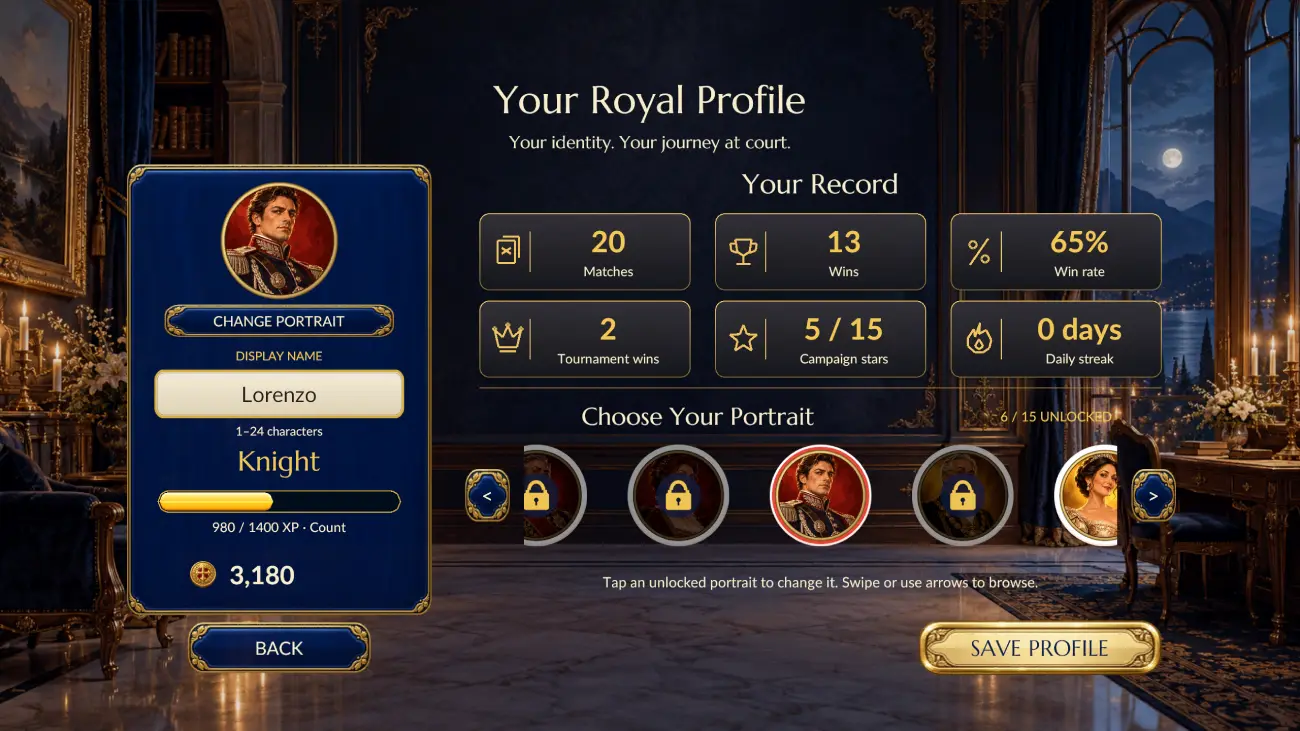
Players choose an unlocked portrait, enter a display name, and view their match record. The profile shows matches played, wins, win rate, tournament wins, campaign stars, and daily streaks.
Progress uses local saved data. Names, selected portraits, settings, earned progress, and equipped cosmetics remain on the device between sessions.
XP, ranks, and campaign rewards
Match rewards include XP and coins. Players move through the court titles Page, Squire, Knight, Count, Duke, and Regent. Animated yellow progress bars show progress toward the next rank.
The campaign has five evenings and three star objectives per evening. Its challenges include winning, limiting draws, and finishing within a time target.
A shop built for browsing
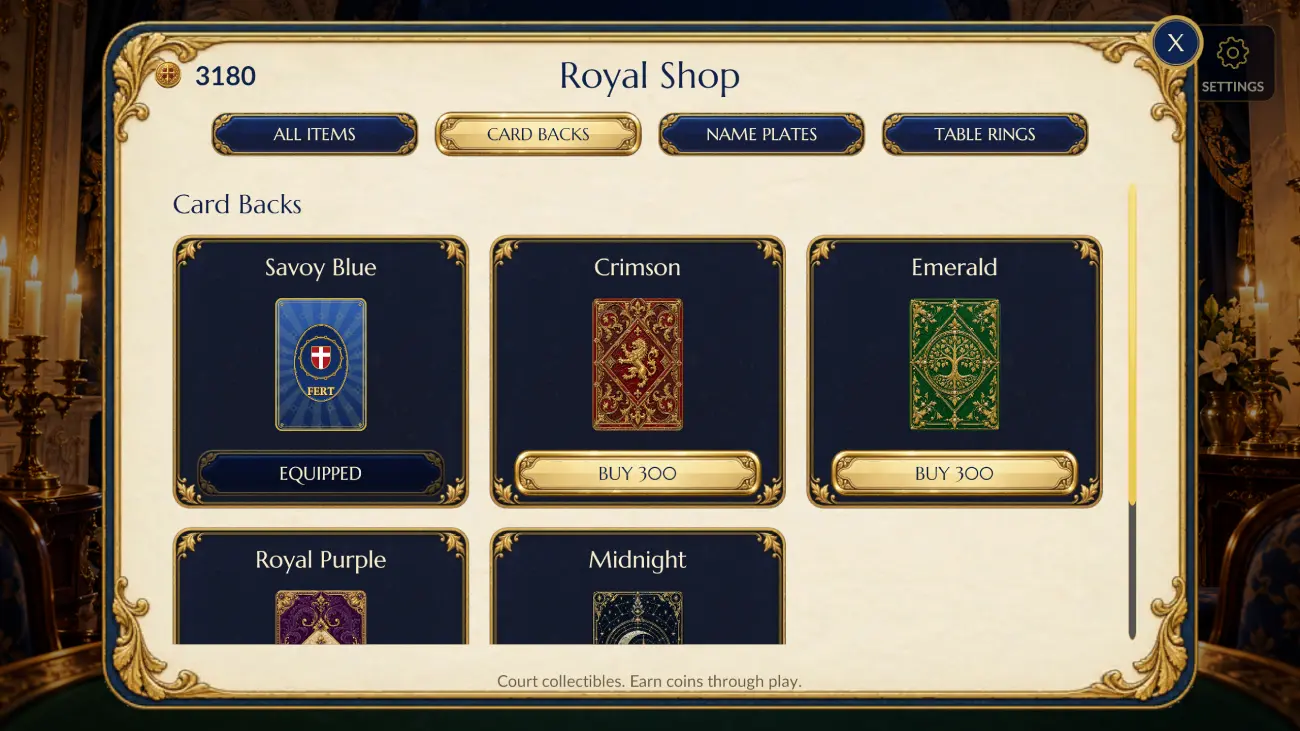
The Royal Shop uses a scroll view and category tabs for card backs, nameplates, and table rings. Players spend earned coins, unlock items, and equip their preferred look.
If the balance is too low, a clear popup shows the item price, current balance, and missing coins. The shop keeps the player’s browsing position after the message closes.
Court rivals with different behaviour
The game includes 15 court characters with portraits, roles, dialogue, skill levels, and personality-based card choices. Rivals can behave cautiously, aggressively, cleverly, chaotically, or in a balanced way.
A separate table-selection flow offers two-, three-, and four-player options, with clear seat labels and a confirmation step before the table starts.
Inside the game
Five screenshots from the playable project
These landscape captures show three game environments, the profile page, and the collectible shop. They were captured directly at 2560 × 1440. The profile uses an illustrative saved record to show the available statistics.
Design and engineering
How NipsApp built the royal game experience
Responsive UI and readable text
The interface uses navy, ivory, gold, emerald, and crimson. Serif headings support the court theme, while clear body fonts make instructions and statistics easy to scan.
Safe-area layouts keep controls away from phone cutouts. Scene backgrounds fill wide displays without stretching. Compact symbol-and-text menu buttons leave room for the character and central play actions.
Character animation and themed effects
An animated royal fox gives the menu a recognisable host. Native animation states support idle movement, greetings, reactions, and celebrations.
Card highlights, restrained gold effects, smooth button states, and animated progress bars connect actions to feedback. A reduced-motion setting gives players a calmer presentation.
Separate music and card audio
The menu and gameplay scenes use different music tracks. The gameplay mix reduces music by 60% relative to the selected music level, making room for card sounds and feedback.
Dealing and playing a card use different sound cues. Button clicks, popup sounds, volume sliders, and the main sound toggle are handled across the menu and game scenes.
Branding and onboarding
The game includes a company splash with a clear message, smaller brand logos, and a matching main-menu footer. A 512 × 512 icon source supplies the Android and Windows launcher artwork.
An in-game guide introduces the rules and royal power cards. First-time profile entry, settings, pause, resume, and return-home flows support the complete session.
From feedback to playable builds
Testing, project delivery, and the outcome
What was tested?
Project checks covered mode selection, real dealt matches, result screens, profile saving, shop purchases, insufficient-coin feedback, card sound triggers, music switching, and the two-, three-, and four-player selector.
Layout checks included 2560 × 1440 desktop, 2400 × 1080 wide-phone layouts with safe-area insets, and 1280 × 960 tablet layouts. Audio checks inspected non-silent output rather than only checking whether a sound file existed.
What was delivered?
The handover included Unity source code, game assets, scripts, settings, build tools, Android APKs, Windows executable packages, launcher artwork, five landscape store screenshots, and verification reports.
The source and working files were also archived with an inventory and integrity checks. This gives the project a documented base for later development and release preparation.
The result was a playable royal card-game project with a complete menu-to-match loop. Its six modes, progression, customisation, and distinct environments support different play styles within one visual theme. The handover brings the rules, art, interface, local progression, and platform builds together in one maintainable Unity project.
Common project questions
Regalia Cards questions and answers
What category does Regalia Cards belong to?
Regalia Cards belongs to the card-game category. Its secondary descriptions are casual strategy and turn-based play. The documented design uses earned coins for cosmetics rather than cash wagering.
Who developed Regalia Cards?
NipsApp Game Studios developed the Regalia Cards project for The RoyaLand brand. The work covered gameplay systems, interface design, illustrated scene integration, animation, audio, testing, and build delivery.
Which engine and platforms does the project use?
The project uses Unity and C#. Delivered test packages include an Android APK and a Windows desktop executable. The documented delivery covers these two platforms.
How many game modes are included?
There are six single-player modes: Quick Game, Court Campaign, Daily Challenge, Blitz, Elimination, and Tournament. Each mode has its own illustrated table environment.
Does Regalia Cards have computer opponents?
Yes. Court rivals use card-scoring logic influenced by personality and skill. The character roster includes 15 courtiers with portraits, roles, and short table dialogue.
How are player records and collectibles saved?
The game stores profile details, settings, campaign progress, item ownership, and equipped cosmetics locally on the device. This lets the game restore the same local profile when the player returns.
Can players customise the game?
Yes. Players can choose unlocked portraits, edit a display name, equip card backs, nameplates, and table rings, and adjust supported house rules, audio settings, and reduced motion.
Can NipsApp develop a similar card game?
NipsApp Game Studios can discuss a custom card-game project covering rules, visual design, computer opponents, progression, interfaces, and platform builds. The required platforms and any live multiplayer backend should be defined in the project brief.
 View on Apple Maps

