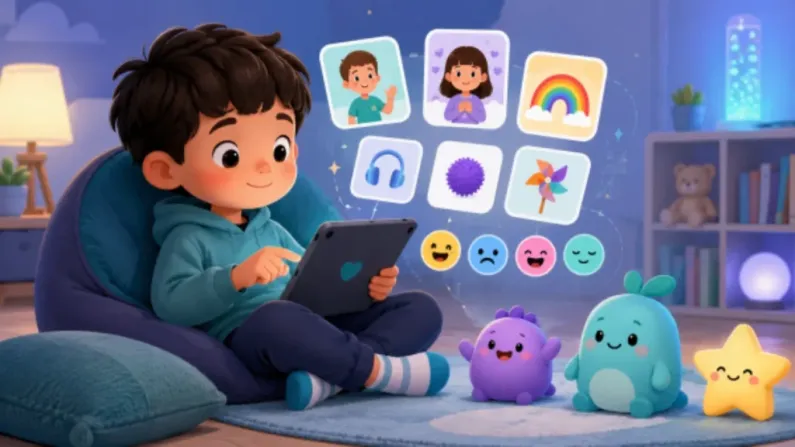
Creating an autism app for kids is not only about building games or adding colorful screens. It needs careful planning, calm design, visual learning, simple interaction, communication support, and real involvement from parents, teachers, and therapists.
Many autistic children learn better with pictures, routines, repetition, and clear instructions. A good autism learning app for kids should support those needs without making the experience stressful. The goal is not to replace parents, teachers, or therapists. The goal is to give children a helpful digital tool they can use for learning, communication, daily skills, and confidence.
According to the World Health Organization, autism is a diverse group of conditions related to brain development, and the needs of autistic people can vary widely: https://www.who.int/news-room/fact-sheets/detail/autism-spectrum-disorders
That is why anyone planning to build an app should think about flexibility from the start.
TLDR of How to Create an Autism App for Kids
- An autism app for kids should focus on visual learning, communication, routines, emotions, and daily skills.
- The app should be calm, simple, and easy for children, parents, teachers, and therapists to use.
- Useful features include learning games, communication cards, visual schedules, emotion activities, and progress tracking.
- The app should avoid loud sounds, flashing visuals, too much text, and confusing screens.
- Development cost depends on features, design quality, games, dashboards, platforms, testing, and updates.
Quick Summary Table:
| Area | Summary |
|---|---|
| Target users | Autistic children, parents, teachers, therapists, schools, NGOs, and therapy centers |
| Main app purpose | Support learning, communication, routines, emotions, and daily skills |
| Key features | Visual games, communication cards, visual schedule, social stories, dashboard |
| Best technology | Unity, Flutter, React Native, Firebase, backend system |
| Cost factors | Number of games, platforms, design, backend, dashboard, audio, testing, updates |
| Development approach | Start with an MVP, test with users, improve based on real feedback |
What Is an Autism App for Kids?
An autism app for kids is a digital learning and support tool made for autistic children. It can help with simple learning tasks, communication, routines, emotions, social situations, and daily life skills.
A strong autism educational app should use more visuals than text. It can include picture cards, matching games, sorting activities, sound games, routine boards, and simple rewards. For some children, the app may help them choose what they want. For others, it may help them practice emotions, follow a schedule, or learn basic concepts like colors, shapes, sounds, and objects.
A good autism therapy app for children should be designed with care. It should support guided learning and not make medical claims. It should also allow adults to adjust content based on the child’s comfort and learning level.
Who Will Use the App?
Before starting autism app development, you need to know who will use the app. The child is the main user, but adults need their own tools too.
Parents may use the app at home to support routines, communication, and learning practice.
Autistic children may use the app to play learning games, choose picture cards, follow routines, and express simple needs.
Teachers may use it in classrooms for structured learning activities.
Speech therapists may use communication cards and visual choice tools.
Occupational therapists may use routine, sensory, and daily skill activities.
Special education centers may use the app with many children and track progress.
Therapy clinics may need child profiles, session records, and reports.
NGOs and child development organizations may want a scalable app that works across different learning levels and languages.
Main Features Needed in an Autism App for Kids

Visual Learning Games
Visual learning games are one of the most useful parts of apps for autistic children. These games can include matching, sorting, picture association, sound recognition, color learning, shape learning, and daily object identification.
For example, a child may see four pictures and be asked to tap the apple. Another game may ask the child to match a toothbrush with brushing teeth. These small activities help children connect pictures, actions, sounds, and meanings.
Communication Cards
Communication cards can help children express simple needs. These can be PECS-style picture cards where the child taps images for food, water, toilet, help, break, happy, sad, play, or sleep.
This kind of autism communication app feature should be simple. Each card should have a clear image, optional voice output, and a label that adults can turn on or off.
Visual Schedule
A visual schedule helps children understand what comes next. It can include routine cards such as wake up, brush teeth, breakfast, school, therapy, play time, dinner, and sleep.
This is useful for home, school, and therapy settings. Parents or teachers should be able to rearrange the schedule, add custom cards, and mark activities as done.
Emotion Recognition
Emotion recognition activities can help children identify simple feelings through faces, characters, and real-life situations. For example, the app can show a happy face, sad face, angry face, or scared face and ask the child to match it with the correct emotion.
The design should stay gentle. The goal is practice, not pressure.
Social Stories
Social stories are short interactive stories that explain common situations. Examples include going to school, waiting for a turn, visiting a doctor, sharing toys, or meeting new people.
Each story should use simple scenes, short sentences, calm characters, and clear choices. This can help children prepare for real situations in a safe way.
Parent and Teacher Dashboard
A parent and teacher dashboard helps adults understand how the child is using the app. It can include child profiles, completed skills, weak areas, daily usage, custom content, and activity history.
For schools, therapy centers, startups, and organizations planning to build a custom autism learning app, working with an experienced team like NipsApp Game Studios can help turn the idea into a structured product with visual learning tools, interactive games, parent dashboards, and scalable app features.
Best Game Ideas for an Autism Learning App
Kids autism learning games should be simple, visual, and repeatable without becoming boring. Here are practical game ideas:
- Emotion Match Game: Match faces with emotions like happy, sad, angry, tired, or scared.
- Sound Recognition Game: Listen to a sound and choose the correct picture, such as dog, bell, car, or rain.
- Daily Routine Builder: Arrange cards in the correct order, like brush teeth, eat breakfast, go to school.
- Color and Shape Sorting: Sort objects by color, shape, size, or category.
- Social Situation Game: Choose what to do in situations like waiting, sharing, or asking for help.
- Reward Garden: Children earn stars, flowers, or simple items after completing activities.
- Calm Breathing Game: Follow a slow animation to practice calm breathing.
- Object Matching Game: Match real-life objects with their use, like spoon with eating.
- Memory Pair Game: Find matching picture pairs.
- Visual Choice Game: Pick between two or more options using images.
The key is to randomize questions, answer positions, images, and difficulty. Repeating the same order every time makes the app less useful.
Design Guidelines for Autism Apps

A visual learning app for autism should feel calm and predictable. The design should help the child focus.
Use calm colors. Avoid flashing lights. Avoid loud sudden sounds. Use large buttons. Use simple characters. Give one instruction at a time. Keep screens clean. Use predictable navigation. Add skip and break options. Use positive rewards. Do not punish wrong answers.
Parents should control sound, difficulty, animation speed, and content. Some children may enjoy sound effects, while others may find them uncomfortable. Good special needs app development should allow these settings to be changed easily.
Technology Stack for Autism App Development
The technology depends on what kind of app you want to build.
Unity is a good choice for game-based learning apps with animation, rewards, mini-games, and interactive scenes.
Flutter works well for mobile apps with dashboards, profiles, settings, and clean UI across Android and iOS.
React Native is another option for cross-platform app development when the app needs strong mobile features.
Firebase can handle login, storage, user data, and progress tracking for many MVPs.
A backend system is useful for admin panels, reports, content management, school accounts, and therapist tools.
AI can be used carefully for personalization, such as suggesting easier or harder activities based on usage. But AI should not replace expert guidance, therapy planning, or adult supervision.
How Much Does It Cost to Create an Autism App for Kids?
The cost depends on the size and quality of the product. A simple MVP costs less than a full production app with multiple games, parent dashboards, school accounts, reports, animations, and advanced personalization.
Main cost factors include:
- Number of games
- Design quality
- Android, iOS, or both
- Backend and admin panel
- Parent dashboard
- Custom learning paths
- Audio and animation
- Testing
- Maintenance and updates
If the app is for one school or clinic, the scope may be smaller. If it is for public launch, it needs stronger testing, better onboarding, data privacy planning, app store setup, and long-term updates.
You can also explore NipsApp Game Studios’ work in educational game development and custom app development
Mistakes to Avoid When Building an Autism App
Many autism app ideas fail because they are built like normal kids games. This can create problems.
Avoid making the app too noisy. Do not use too much text. Avoid fast animations. Do not forget parent controls. Do not skip progress tracking. Do not repeat the same questions again and again. Add randomization. Include accessibility settings. Get expert review. Test with real users when possible. Do not copy another app directly.
The best autism educational app should be original, respectful, flexible, and built around real user needs.
Final Thoughts
Learning how to create an autism app for kids starts with understanding the child’s needs. The app should be calm, visual, simple, flexible, and easy for adults to manage.
A strong app can include visual learning games, communication cards, daily schedules, emotion activities, social stories, progress tracking, and parent or teacher controls. It should not be rushed or overloaded with features. Start with the core experience, test it carefully, and improve based on real feedback.
If you are planning how to create an autism app for kids, focus on care first, then features, then technology. That is the right order for building something useful.
 View on Apple Maps