How NipsApp Built an AI Avatar Guide and 360 Video Venue Tours for Qatar's Ministry of Sports and Youth
NipsApp Game Studios filmed sports venues in Doha in 360 video and built an AI avatar guide that walks people through them, from the main gate to the pitch, and answers their questions out loud in Arabic or English. It runs in a browser, on a touch screen or inside a VR headset.
At a glance
- Client
- Ministry of Sports and Youth, State of Qatar
- Built by
- NipsApp Game Studios
- Venues filmed
- Al Sadd Sports Club and Al Ahli Sports Club, Doha
- Format
- 360 video routes with an AI avatar guide
- AI work
- Voice AI in Arabic and English, speech recognition, neural voices, grounded answers
- Languages
- Arabic and English, voice and text
- Runs on
- Web browser, touch screen kiosks, VR headsets
- First working version
- Under two weeks from the brief
- Live project
- qatar-venue-explorer.netlify.app
The short version
NipsApp Game Studios built a venue explorer for Qatar's Ministry of Sports and Youth. Visitors pick a venue on a map of Qatar, step inside, and move through the building as continuous 360 video filmed on site. An AI avatar guide speaks Arabic and English, takes people where they ask to go, and answers questions about each venue from information the Ministry approved.
The Ministry was comparing vendors. One of them had shown a recorded video. We decided to show something they could use in the meeting room instead: a working link, built on their own venues, that anyone at the table could try.
What the Ministry asked for
The brief was simple to say and hard to do well. Show the Ministry's venues on a map of Qatar. Let a visitor choose one. Take them inside, and give them a guide they can talk to.
Three things mattered more than anything else:
- It had to feel like being there. Clicking from one photo to the next was not good enough. People wanted to walk from the hallway to the pitch the way you would in real life.
- It had to work in Arabic first. Not a translated afterthought. Arabic voice, Arabic text that reads right to left, Arabic voice commands.
- It had to run anywhere. A laptop in a meeting, a touch screen at an event, a VR headset at an exhibition stand.
How a visit works
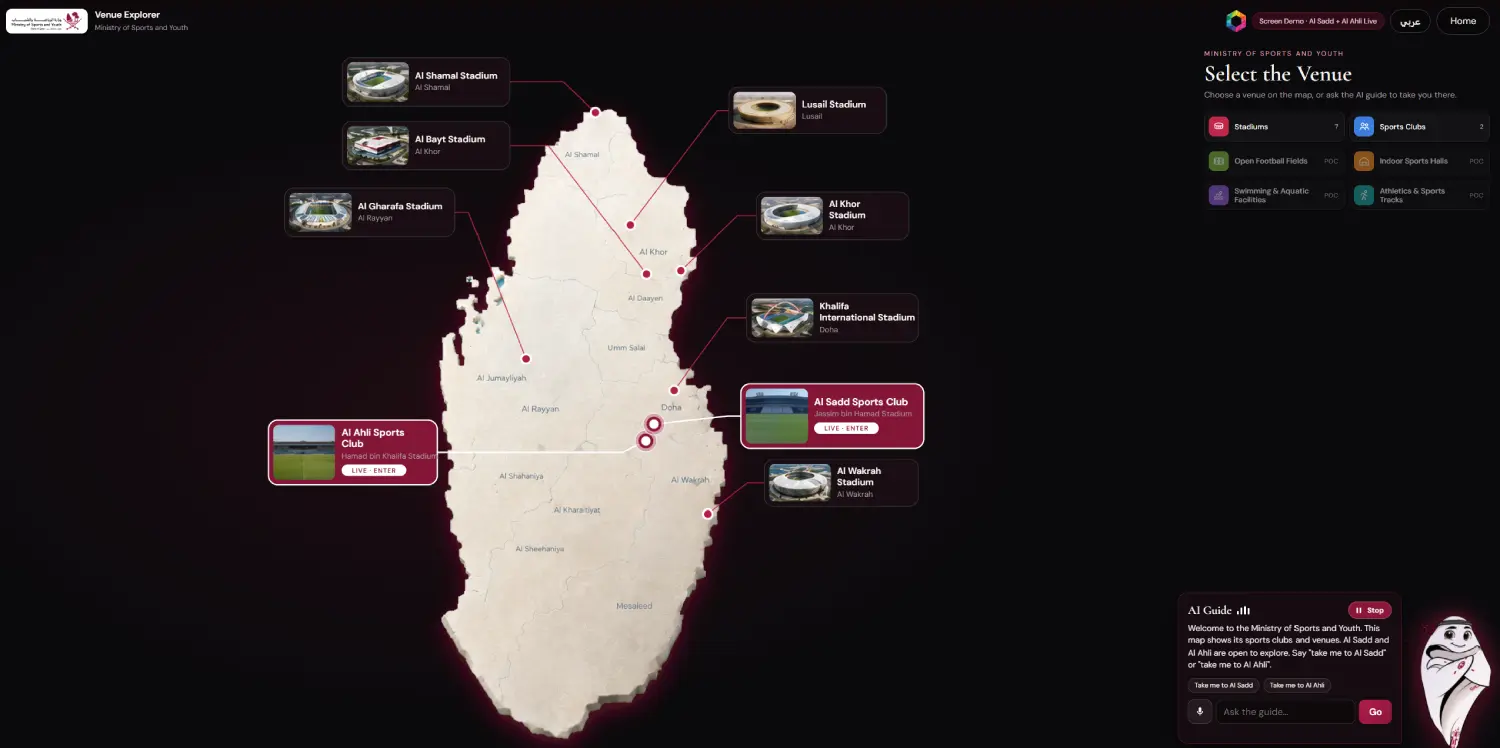
- Choose a venue. A relief map of Qatar shows the Ministry's stadiums and clubs as pins with photo cards. Tap one, or just say "take me to Al Ahli".
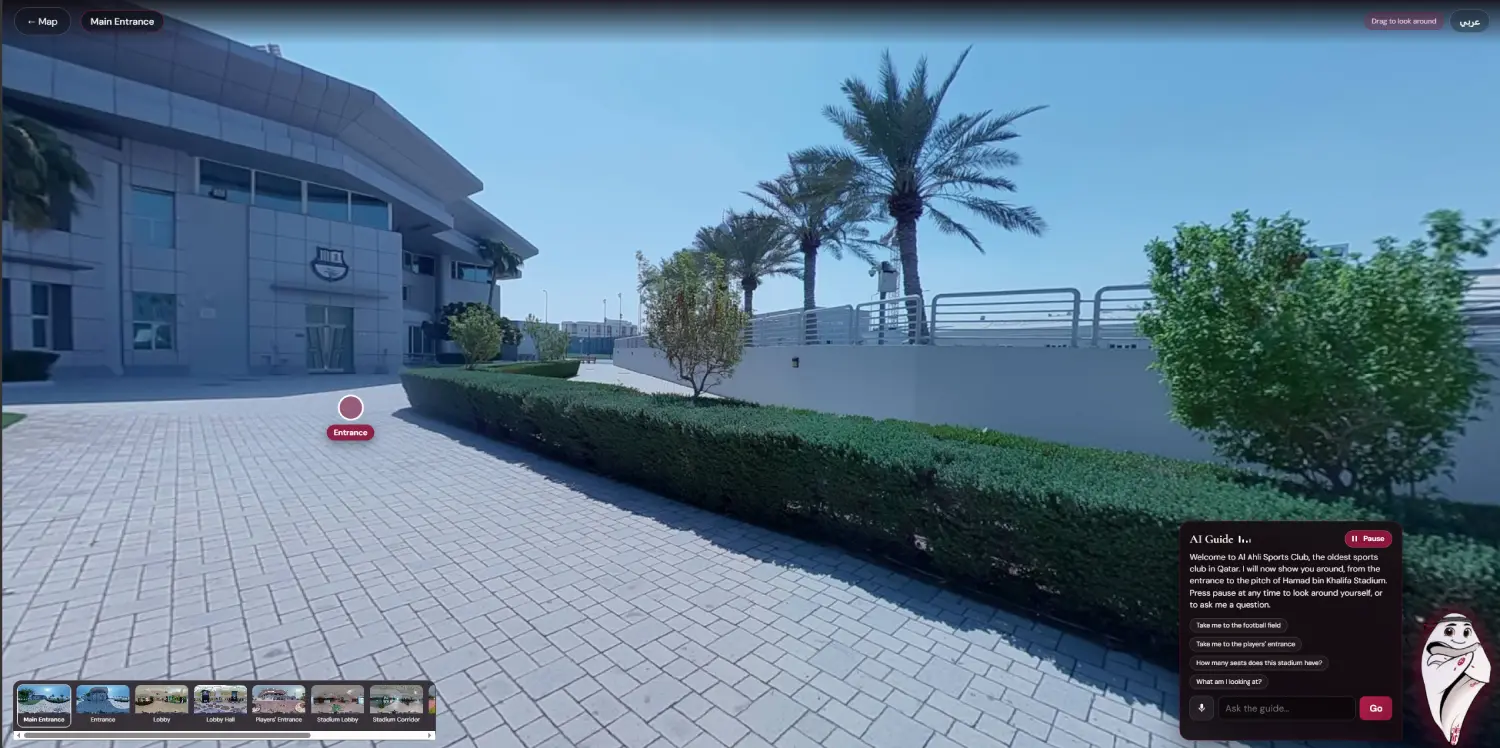
- Arrive at the gate. The map zooms into the pin and you are standing at the venue's main entrance, in full 360.
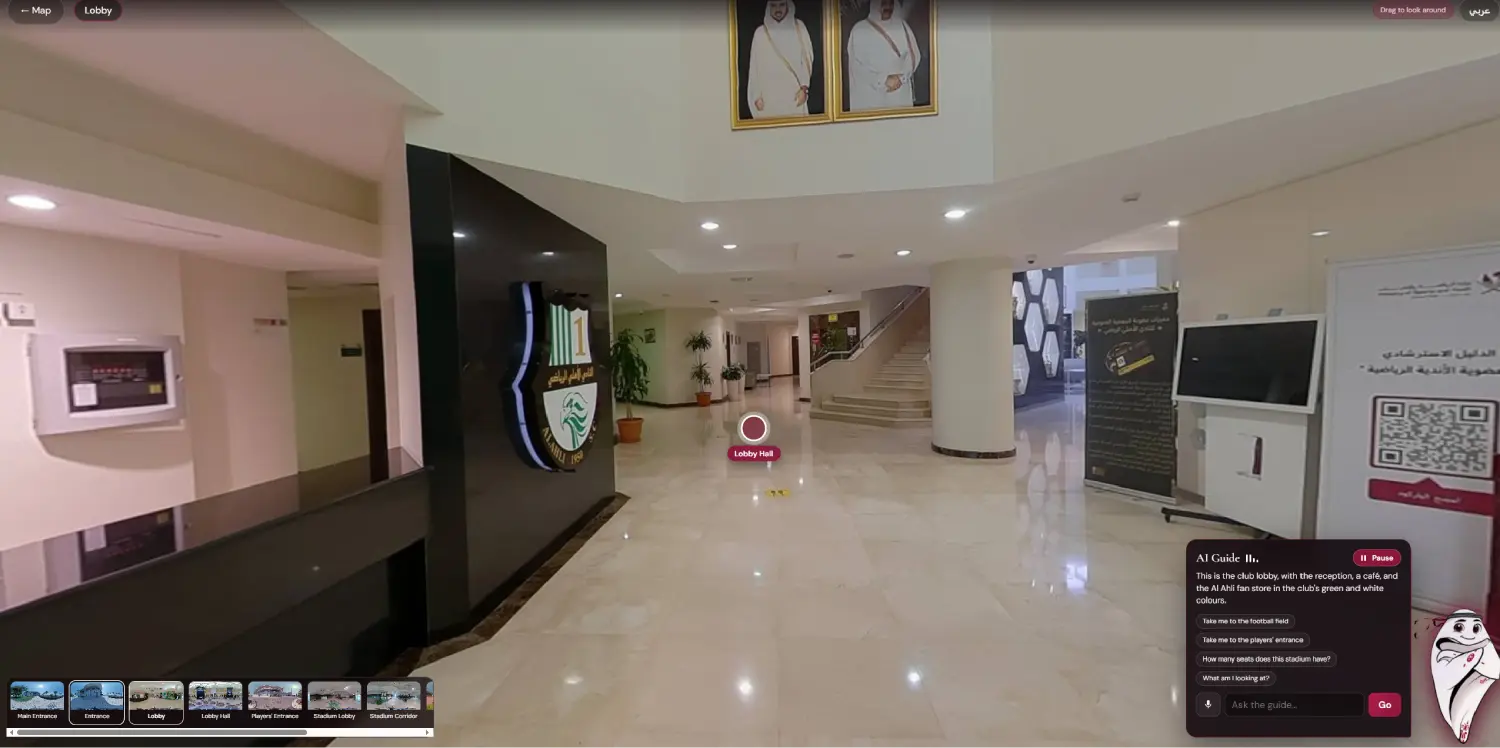
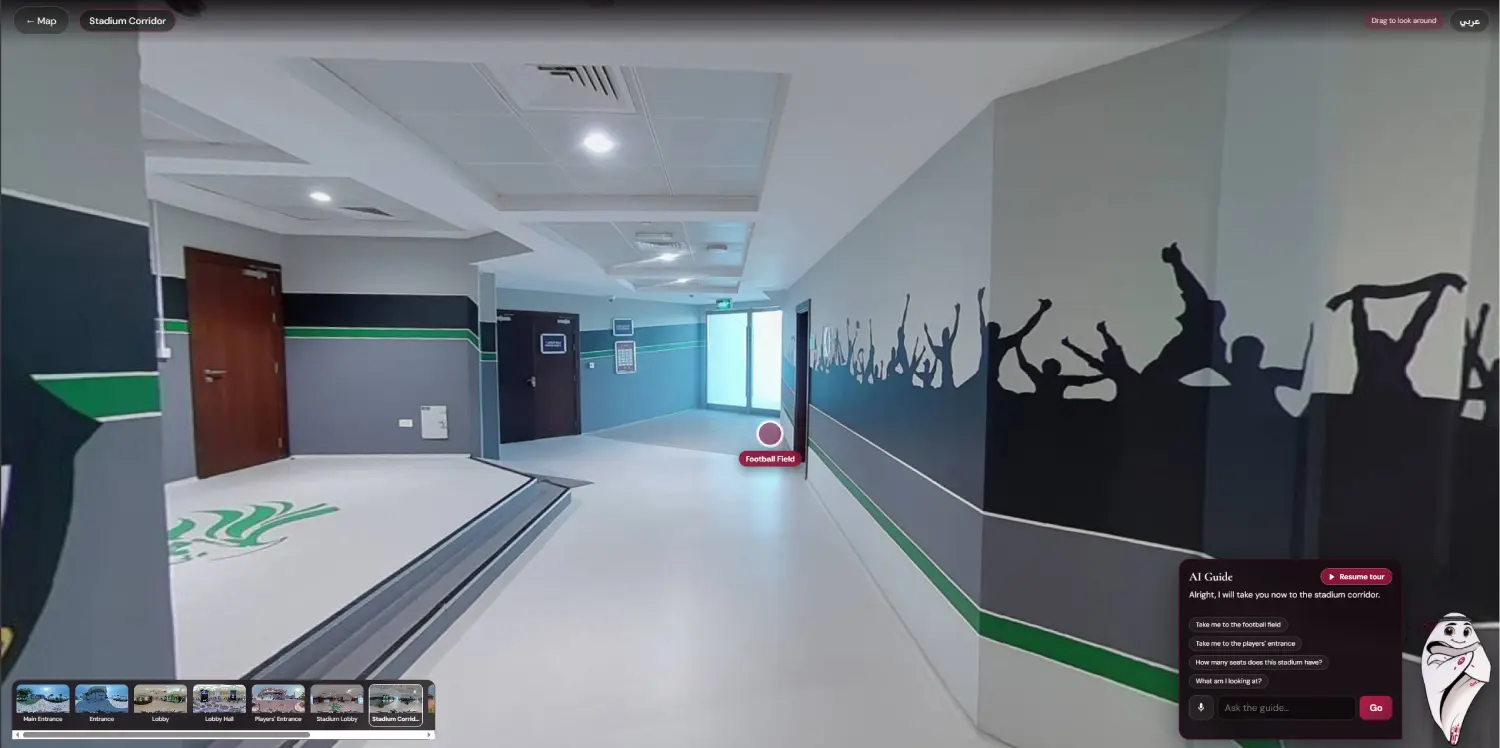
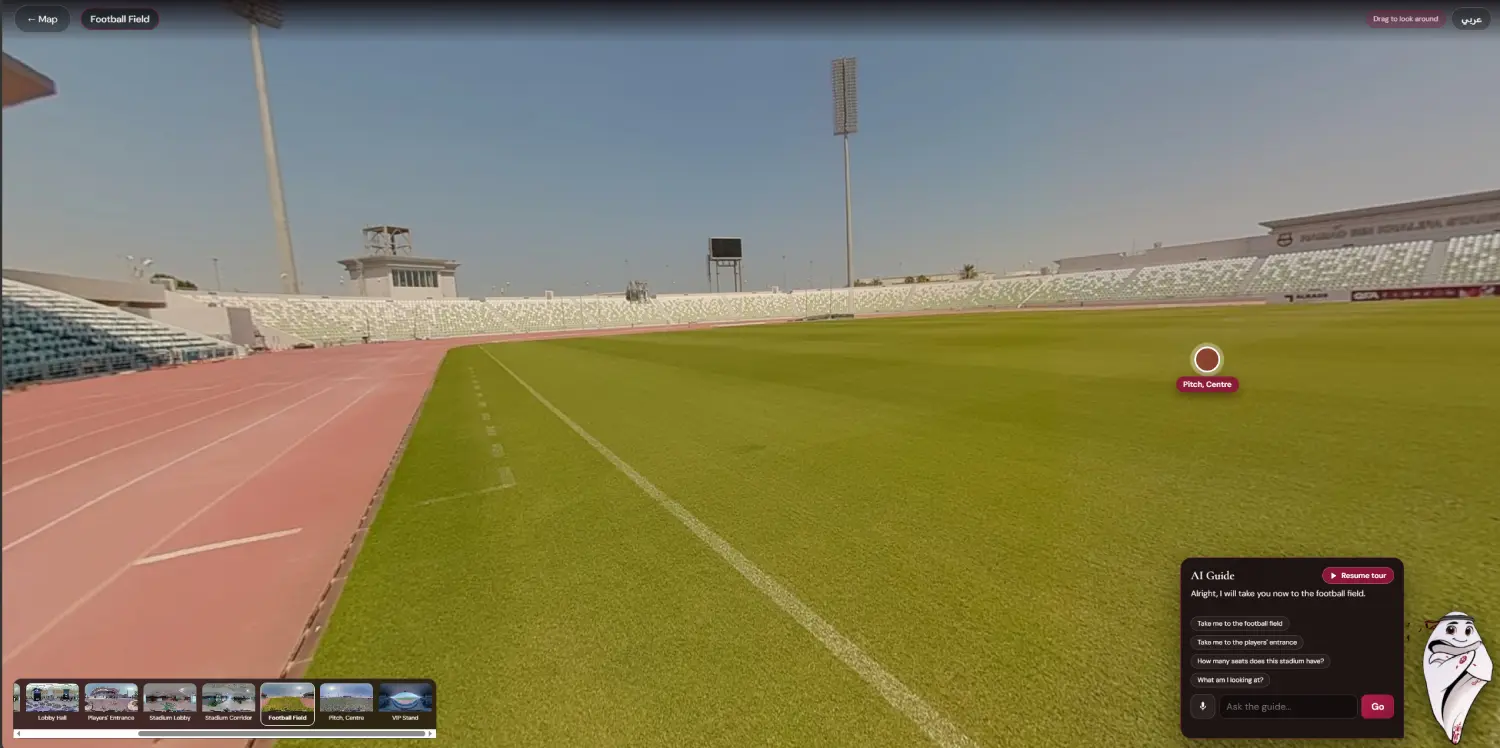
- Take the tour. The guide starts walking you through: entrance, lobby, the majlis, the players' corridor, out onto the pitch and up to the VIP stand. It talks about each place as you pass it.
- Take over whenever you like. Press pause and the guide stops mid-sentence. Look around, drag the view, or walk on yourself. Ask a question and the tour waits for you.
- Ask anything about the venue. "How many seats does this stadium have?" "What am I looking at?" "Take me to the VIP stand." The guide answers out loud and moves you there along the real route.
Why we filmed it in 360 video, not photos
Our first version used the Ministry's existing 360 photographs. It worked, and it got the project approved, but every move was a jump from one spot to the next. The Ministry wanted the feeling of walking, so for the proof of concept we went back to the venues with a camera.
Each route was filmed as one continuous 360 video, walking at a steady pace at eye height. In the app, the video moves only when the visitor moves. Stop, and the frame holds. Look left, right, up or down at any point, moving or still. When you ask the guide to take you somewhere, it plays the real route there, faster than walking, so you see every corridor and doorway on the way instead of a fade to black.
The difference is easy to describe. With photos you are teleported. With video you walk in.
What filming on site involved
- An 8K 360 camera on a stabiliser, carried at eye height so the view feels like your own.
- One unbroken take per route, so there are no cuts in the middle of a walk.
- Routes planned around the places people actually ask about: gate, lobby, majlis, corridor, pitch, stands.
- Same time of day for every take, and nobody walking in front of the lens.
- Colour matched across takes, then encoded so it streams smoothly in a normal browser.
The AI guide
The guide is the part people remember, so we spent the most time on it.
It listens
Visitors speak normally. The guide understands requests in Arabic and English, including the different ways people phrase the same thing, and Gulf Arabic phrasing like "وين أنا".
It talks back
Every answer is spoken aloud with captions on screen. The Arabic voice is a Qatari voice. The English voice is a native speaker.
It knows where you are
Ask "what am I looking at?" in the corridor and you get the corridor, not a stock answer. It describes what is around you at that point in the route.
It sticks to the facts
Answers about capacity, history and facilities come from information approved by the Ministry. If it does not know, it says so. It does not guess.
The guide also has a pause button right next to its name. That came straight from the client's first review: once a guide starts talking, people want a way to stop it. Pressing pause cuts the voice and hands control back to the visitor immediately.
The AI avatar
The guide is not a chat box in the corner. It is a character that stands on screen beside the conversation for the whole visit, from the map to the last stop on the pitch. The client asked for it to stay still and always in view, so people know who they are talking to, and only the conversation next to it changes.
We built the avatar's behaviour around three moments:
- When it speaks, it lights up and a sound bar moves beside its name, so you can tell at a glance that the guide is talking.
- When it listens, the microphone button pulses and the guide waits for you. It stops talking the moment you press the microphone, so it never talks over the visitor.
- When you take over, the pause button beside its name stops the voice and the tour at once, and the same button brings the guide back.
The avatar looks and sounds the same in a browser, on a touch screen and in a VR headset, and it switches between Arabic and English with the rest of the experience.
The AI work behind it
Most of the engineering in this project is AI work that visitors never see. Here is what is running under the guide.
Speech recognition in two languages
The guide listens in English and in Qatari Arabic, and switches with the interface language. It takes the top few guesses for every sentence, not just the first, so a noisy room is less of a problem.
Understanding what people mean
People ask for the same thing in many ways. The language layer maps those phrasings to actions, normalises Arabic spelling, and handles common mishearings of local words like "majlis".
Natural voices
Every answer is spoken by a neural voice: a native American English voice and a Qatari Arabic voice. Lines were checked by transcribing them back, so names like Jassim bin Hamad and Hamad bin Khalifa come out right.
Answers grounded in approved facts
The guide answers from a knowledge set built for each venue and approved by the Ministry. It does not invent figures, and when it does not know, it says so.
Location awareness
The guide always knows which part of the venue you are in, so "what am I looking at?" gets an answer about the place in front of you.
Tour direction
The guided tour decides what to say, when to move and when to wait. It hands control to the visitor the moment they ask something, and picks up again when they are ready.
Arabic and English, properly
One button switches the whole experience. Text flips to right to left, venue names and labels change, the guide's voice changes, and speech recognition switches to Qatari Arabic. Captions, buttons, the map and the tour all follow. Venue names, facts and the guide's lines were written for Arabic, not run through a translator, because a wrong word in front of a ministry is worse than no word at all.
One experience on every device
It is the same content everywhere. Only the controls change.
- Laptop or large screen: keyboard, mouse and voice.
- Touch screen kiosk: an on-screen joystick and buttons.
- VR headset: look around with your head, move with the controllers.
- Treadmill or bike at events: a walking treadmill or a bike sensor can drive the video, so it moves as fast as you walk or pedal.
Delivered privately
Government work needs care with access. The project is shared as a private link behind a login that is checked on the server, so nothing loads until the right credentials are entered. It is hidden from search engines and cannot be embedded on other websites. Access can be switched off at any time with one change.
Screenshots
How it is built
| 360 video | 8K capture on site, one continuous take per route, encoded for smooth browser playback |
|---|---|
| Viewer | WebGL in the browser, with a VR mode for headsets |
| AI avatar guide | On-screen guide character with speaking and listening states, visible from the map to the end of the tour |
| Voice AI | Speech recognition in English and Qatari Arabic, intent matching with Arabic normalisation, neural text to speech |
| Knowledge | Venue facts approved by the Ministry, location aware answers, no invented figures |
| Voice | Native English and Qatari Arabic voices, captioned |
| Map | Relief map of Qatar in the Ministry's style, venue cards and category filters |
| Controls | Mouse, touch and VR controllers, with treadmill and bike sensors as an option for events |
| Delivery | Private web link, server side login, no search indexing |
What we learned
Show, don't pitch. A link people could open in the meeting did more than any slide. The working demo is what moved the project forward.
Movement is the whole point. The first feedback on the photo version was not about how it looked. It was about how it moved. People wanted to walk, not jump. That is why the proof of concept moved to video.
Give people an off switch. A talking guide is charming for ten seconds and annoying after thirty if you cannot stop it. The pause button came out of the client's first review, and it is one of the smallest changes we made.
Language is not a setting. Arabic needed its own voice, its own layout and its own way of asking questions. Treating it as a translation would have shown.
Questions we get about this project
Can visitors walk anywhere, like in a video game?
With 360 video you move forward and back along the filmed routes and can look anywhere at any time, but you cannot step sideways off the route. Where full freedom is needed, we capture that area in 3D from video, so visitors can walk in any direction. The two can be combined in one experience.
Does it work in a VR headset?
Yes. The same experience runs in a browser, on a touch screen and in a VR headset. Only the controls change.
How long does it take to add a venue?
Most of the work is planning the routes and filming them. Once the platform exists, a new venue is mainly a filming day plus editing, scripting the guide and testing.
Can the guide answer questions it was not prepared for?
It answers from a set of approved information about each venue. If a question falls outside that, it says it does not have the answer and suggests what it can help with. For government clients we think that is the right behaviour.
Does NipsApp build AI avatars and voice agents for government clients?
Yes. This project for Qatar's Ministry of Sports and Youth is one example: an AI avatar guide with Arabic and English voice, built for a government audience where accuracy and control matter. We build AI guides, voice agents, AI avatars and interactive AI experiences for ministries, venues, museums, events and exhibitions.
Can the AI guide work in Arabic?
Yes. It listens and speaks in Qatari Arabic as well as English, with right to left text, and switches between the two with one button.
Who built it?
NipsApp Game Studios, a game, VR and AI studio in Trivandrum, India. We build games, VR and AR experiences, AI avatars and voice guides, and interactive projects for clients in the Gulf, Europe and North America.
Planning an AI guide or a virtual visit?
We build AI avatars, voice guides in Arabic and English, 360 video tours and VR experiences for ministries, government entities, venues, museums and events. If you have a place people should be able to visit and ask questions about from anywhere, we would like to hear about it.
 View on Apple Maps
