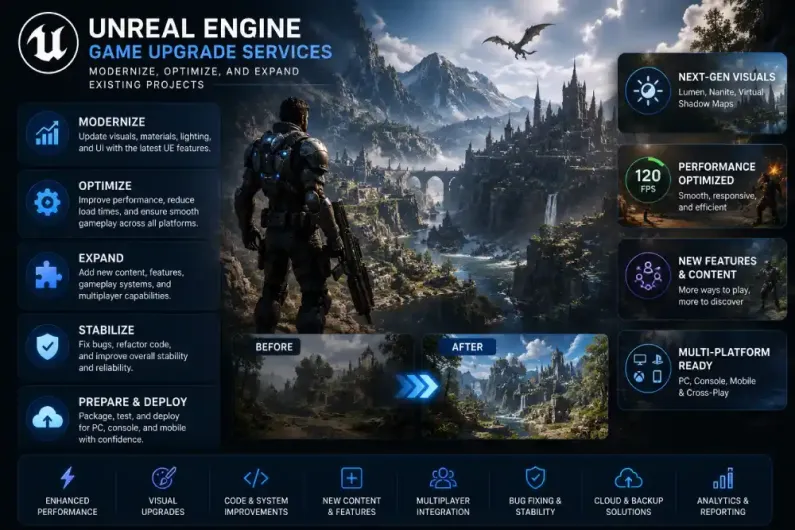
You already own an Unreal Engine project. It might be a shipped title that has slowly aged out of visual parity with newer releases, a project that was paused between milestones, or a codebase inherited from a previous team that still holds promise but needs modern hands. In every one of these cases the smartest move is usually not a full rebuild. It is a focused upgrade.
An Unreal Engine game upgrade brings a live or dormant project up to current engine, platform, and player expectations without discarding the work already invested. Handled well it protects the identity of the game, extends its lifespan, and turns technical debt into new features and new revenue.
This guide covers where existing Unreal Engine projects tend to fall behind, the specific areas an upgrade can address, and how a serious upgrade project runs from technical audit to relaunch.
Why Unreal Engine games become outdated
Engine releases move fast. Between UE4.20 and the current UE5 line the toolchain, rendering pipeline, physics stack, animation systems, and networking layer have all changed enough that a project untouched for a couple of years feels visibly behind. Nanite, Lumen, Chaos physics, PCG, Iris networking, MetaHuman, the improved MetaSounds pipeline, and Enhanced Input all set a new baseline that players and platform holders now expect.
Platforms move just as quickly. Console SDKs change, Steam introduces new requirements for features like the Steam Deck verification pipeline, and PC hardware has jumped in ray tracing capability. A build that shipped against older console firmware may fail certification the moment it needs an update.
Even without engine or platform changes, projects accumulate technical debt. Blueprints grow deeper than they should, plugins are abandoned by their original authors, third-party SDKs stop receiving updates, and the original engineers move on. What was once a clean, shippable project turns into something no one wants to touch.
What an Unreal Engine game upgrade actually covers
Modernization is not a single service. It is a set of focused technical improvements, and the right plan only includes what your project needs. The areas below are the ones most Unreal upgrade projects touch.
Engine migration to a newer Unreal Engine version
Most upgrade projects begin with an engine version migration, typically from UE4 to a current UE5 release. Handled carefully this brings access to Nanite, Lumen, updated Chaos physics, improved animation blending, and stronger networking. Migration has to be staged. Deprecated APIs, changed Blueprint node behavior, incompatible plugins, and shader model differences all need to be resolved in order rather than in one lift, and content pipelines need to be validated on real hardware after each step.
Graphics modernization with Nanite and Lumen where they fit
Nanite virtualized geometry and Lumen dynamic global illumination are the headline UE5 features, but they are not automatic wins. Nanite pays off on high-poly static meshes and complex environments. Lumen shines in dynamic scenes where baked lighting has been holding the project back. A good upgrade audit decides where these systems belong and where the older, cheaper approaches remain the correct choice, especially on console and lower-end PC targets. Materials, shaders, and post-processing are then rebalanced around whichever pipeline the project ends up on.
Character, environment, and animation upgrades
A modernization pass on the visual layer usually includes higher fidelity character models, MetaHuman integration where identity permits, improved animation blending, and updated environment art. On the animation side, Control Rig, Motion Warping, and the UE5 animation framework can replace older Anim Blueprints that have grown unmaintainable.
User interface redesign
Older Unreal projects often rely on Slate or first-generation UMG layouts that show their age. Common UI, Enhanced Input, and a proper controller and accessibility pass modernize the front end without touching gameplay code. Menus, HUD, and input flow can be refreshed while keeping saves and progression intact.
Performance, memory, CPU and GPU optimization
Frame drops, hitching, long load times, and shader compilation stalls almost always trace back to overspending in memory, draw calls, tick usage, or streaming. A serious optimization pass profiles the game on real target hardware, cleans up tick groups, tightens LODs, reworks streaming levels or World Partition, tunes RHI settings per platform, and cuts draw calls. On modern GPUs that also means proper use of virtual shadow maps, appropriate Nanite settings, and where relevant, hardware ray tracing.
VR optimization
VR projects have their own upgrade path. Newer headsets bring higher resolutions, improved motion controllers, and different comfort thresholds. A VR upgrade covers foveated rendering support where available, updated OpenXR integration, controller mapping refreshes, room-scale and locomotion improvements, and per-eye instancing to keep frame times inside comfort limits.
Multiplayer, dedicated servers, and backend modernization
Older Unreal multiplayer titles often ran on custom listen servers or lightly modified engine networking. A modern upgrade can move the game to dedicated server hosting, evaluate Iris replication where it fits, integrate a proper backend for authentication, matchmaking, and cloud save, and connect the whole stack to the observability tools a live team needs. LiveOps hooks such as scheduled events, season passes, and remote configuration usually plug in at this stage.
Code refactoring, Blueprint cleanup, and C++ improvements
Years of quick fixes leave most projects with fragile Blueprints and mixed C++ patterns. A refactor pass turns overgrown Blueprints into cleaner asset-based systems, moves performance-critical logic into C++ where it belongs, applies Interfaces and the Gameplay Ability System where they clarify the design, and removes dead code paths. This work is what makes every later addition safer to ship.
Plugin upgrades and third-party SDK replacement
Abandoned plugins are one of the most common blockers in an upgrade project. Modernization replaces or forks unmaintained plugins, updates advertising, analytics, IAP, and voice chat SDKs to their current versions, and removes middleware that no longer justifies its footprint. This step is what makes the game store-compliant again.
Cross-platform support and store readiness
Upgrades often coincide with a platform push, either onto Steam and the Epic Games Store, into console certification, or into VR storefronts. A proper store readiness pass covers Steam integration such as achievements, Rich Presence, cloud save, and Steam Deck verification, Epic Online Services where applicable, console TRC and TCR compliance work, and the certification submission process itself.
DLC, expansions, and long term maintenance
Once the project is stable on the current engine and platforms, an upgrade can extend it. DLC design, expansion pipelines, seasonal content, and LiveOps calendars all become viable. A long term maintenance plan then keeps the game aligned with engine, platform, and SDK updates so it does not drift into another decline.
Realistic scenarios where an Unreal upgrade makes sense
The list above is easier to picture through concrete cases. These are typical of the projects that come in for an upgrade.
A studio has a UE4 title that still sells but has visibly aged. A migration to UE5 with a considered Nanite and Lumen pass, a shader and material rework, and a fresh MetaHuman pass on hero characters gives it a fair chance at a Steam relaunch without touching the gameplay players already like.
A publisher owns a PC action title that needs to look competitive next to newer releases before a paid content update. Rather than rebuild, an upgrade focuses on graphics modernization, a UI refresh, a proper Steam Deck verification pass, and a controller UX overhaul.
A live multiplayer game runs on custom networking that has become expensive to maintain. Backend modernization moves matchmaking, authentication, and persistence onto a modern stack, migrates to dedicated server hosting, and hooks up LiveOps tooling for seasons and remote configuration.
A VR studio has a well-reviewed experience built for an older headset generation. An upgrade pass brings it onto current OpenXR, adds foveated rendering, updates controller mapping and comfort features, and reprofiles the whole title against modern headset targets.
A project has been sitting on a drive since another team stopped work. A technical audit maps out what actually exists, what still runs, and what needs to be replaced, and turns an unfinished codebase into something that can be shipped rather than written off.
How an Unreal Engine upgrade project usually runs
Serious upgrades always start with a technical audit rather than a quote. The team reviews the project, runs the current build on the target hardware, reads the C++ and Blueprints, checks the state of plugins and SDKs, and identifies what is worth keeping and what needs replacing. That review turns into a clear upgrade plan with an ordered scope, hardware and platform targets, and honest trade offs.
Actual work is staged. Engine migration and stability usually go first so every later change lands on a solid base. Graphics, UI, optimization, multiplayer, and content follow in an order that reflects the game’s business goals. Regular builds are shared for review, and integration on real target hardware happens throughout rather than only at the end.
This is the kind of work NipsApp Game Studios has been doing on live Unreal projects since 2010. Working from India and the UAE, the studio brings more than 16 years of engineering experience and over 3,000 delivered projects, with verified client reviews across Clutch, Google, GoodFirms, and Trustpilot. Its teams work across Unreal Engine, Unity, mobile, PC, console, VR, AR, multiplayer, backend systems, LiveOps, and platform publishing, which is what lets an upgrade project cover everything from a single migration to a full graphics, multiplayer, and store readiness pass. Startups, enterprises, and institutions rely on it for long term, production ready engineering rather than one off patches.
For studios that plan to move from Unreal Engine 4 to Unreal Engine 5, Epic maintains an official set of upgrade notes and compatibility guidance that pairs well with a proper technical audit. It is worth reading before deciding on the scope of the work.
Should you upgrade or rebuild?
Not every project should be upgraded, and an honest answer matters more than an easy one. An upgrade is usually the right call when the core game is sound and the issues are about engine version, performance, platform readiness, monetization, or missing features. A rebuild only makes sense when the underlying architecture is so limited that fixing it would cost more than starting fresh, which is rarer than it sounds. A proper audit tells you which side of that line your project sits on before you commit any budget.
Frequently asked questions
Do you keep the existing project code and content?
Yes, as much as possible. An Unreal upgrade is about keeping what still works and rebuilding only what has aged, become fragile, or blocks the roadmap.
How long does an Unreal Engine upgrade project take?
Small migration and stability passes can run a few weeks. Larger projects that include graphics, multiplayer, LiveOps, and store readiness usually run several months. A proper audit turns a rough estimate into a real timeline.
Can you upgrade a project if the original team is gone?
Yes. A technical audit maps out what exists in the source, what still builds, and what needs replacing. Handoff projects like this are common in Unreal work.
Do you handle both UE4 and UE5 projects?
Yes. Most projects that come in are UE4 titles moving to UE5, but pure UE4 stabilization and pure UE5 optimization work also fit inside an upgrade scope.
Will an upgrade break saves or player progression?
A careful plan protects live players. Save format migration, backwards compatibility, and staged rollouts through soft launch regions are standard parts of a serious upgrade.
Can you help with console certification during the upgrade?
Yes. TRC and TCR compliance work, first party account integration, and the certification submission itself can all be included when the target roadmap requires it.
Ready to bring your Unreal Engine project back to life?
If you already own an Unreal Engine game or a paused project and want it to run better, look better, ship on more platforms, and stay competitive, the smartest first step is a technical audit rather than a fresh build. Share the project and the goal, and the NipsApp team can review the current state and put together an upgrade plan built around what your title actually needs.
 View on Apple Maps