Author: Nipin TP N, Founder, NipsApp Game Studios (Trivandrum, India)
Last updated: 2026-02-07
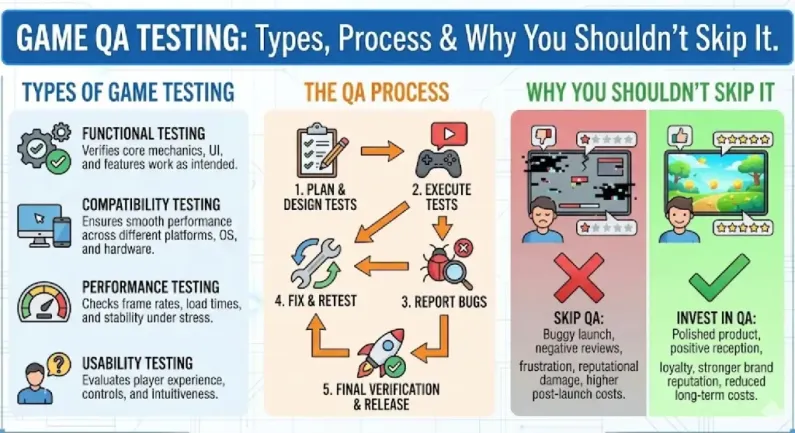
What is game QA testing?
Game QA testing is the process of validating that a game works correctly, remains stable, meets performance targets, and is release-ready across real devices, networks, and store requirements.
Game QA testing is the process of validating that a game is stable, playable, fair, and release-ready across real devices, real networks, and real user behavior. It is not only about finding bugs. It is also about preventing production surprises like crashes, performance drops, save corruption, broken multiplayer sessions, and store rejection.
This guide explains the main types of game testing, how a professional QA process works, what deliverables you should expect from a QA team, and why skipping QA usually costs more than doing it properly.
Quick Summary (what you’ll learn)
- What game QA testing actually covers (beyond “bug finding”)
- The major types of game testing used in real production
- A step-by-step QA process you can follow on any project
- How QA changes for mobile, PC, console, VR, and multiplayer
- The most common mistakes teams make when they “skip QA”
- What to ask a QA vendor or studio before hiring
What Game QA Testing Means (clear definition)
When should QA start in a game project?
QA should start early during development, ideally once the first playable build exists, because early testing prevents large bug backlogs and helps catch architecture and performance issues before they become expensive.

Game QA testing, also called video game quality assurance, is the structured process of checking a game for defects, usability issues, performance problems, compliance risks, and gameplay inconsistencies before release.
This matters because games are not like normal apps. A game is an interactive system with physics, timing, player behavior, and often networking. Small defects can create huge user-facing failures.
What QA testing includes in game development
A real QA scope usually includes:
- gameplay bug detection
- UI/UX validation
- crash and freeze testing
- performance profiling and frame rate checks
- save/load reliability
- compatibility testing (devices, OS versions, GPUs)
- multiplayer session and network simulation tests
- store compliance and submission readiness
- regression testing across builds
What QA testing is NOT
QA is not:
- playing the game casually
- testing only on the developer’s PC
- testing only once before launch
- sending vague bug messages without reproduction steps
- only checking “does it run”
A serious QA process produces structured evidence.
Why You Shouldn’t Skip Game QA Testing
Why is regression testing important in games?
Regression testing is important because game development is iterative, and every new feature or content update can break existing systems like UI flows, save/load, monetization, or multiplayer sessions.
Skipping QA feels like saving time and money. In practice, it usually increases cost and delays. This happens because late bug discovery forces rework, and rework is expensive when the codebase is already large.
QA prevents the most expensive bug types
The most expensive bugs are not small UI issues. The expensive ones are:
- crashes that happen on certain devices
- save corruption bugs
- multiplayer desync bugs
- performance regressions caused by content
- store rejection issues (Google Play / App Store / Steam)
- input and controller bugs that only appear on certain hardware
QA protects your store ratings and retention
For commercial games, ratings and retention matter more than launch speed. A game that launches early but crashes loses players fast, and it is difficult to recover.
QA reduces production risk
QA is a risk control function. It prevents “unknown unknowns.”
If you are funding a game project, QA is one of the cheapest ways to reduce uncertainty.
Types of Game QA Testing (what they are and when to use them)
What are the main types of game testing?
The main types of game testing include functional testing, regression testing, compatibility testing, performance testing, soak testing, multiplayer/network testing, UI/UX testing, and compliance testing for store submission.
Different types of game testing exist because games fail in different ways. This matters because one type of testing cannot replace the others.
Functional testing
Functional testing checks whether the game works as intended.
It validates:
- core mechanics
- menus and navigation
- progression systems
- currency systems
- inventory and items
- quest completion and objectives
Functional testing is the baseline for every project.
Regression testing
Regression testing checks whether previously working features still work after new changes.
This matters because game development is iterative. Every new feature can break old systems.
Regression testing focuses on:
- core loop validation
- UI flow validation
- monetization flows
- save/load integrity
- multiplayer session stability
Regression testing is the backbone of QA.
Compatibility testing
Compatibility testing checks the game on different hardware and software environments.
This matters because games behave differently across:
- Android devices
- iPhones
- GPU models
- OS versions
- screen sizes and aspect ratios
Compatibility testing is mandatory for mobile.
Performance testing
Performance testing checks whether the game meets frame rate and stability targets.
This matters because performance issues are one of the most common causes of negative reviews.
Performance testing includes:
- FPS measurement (30/60/90 targets)
- frame time stability
- memory usage and spikes
- load time validation
- thermal throttling (mobile)
Soak testing (stability testing)
Soak testing means running the game for long sessions to detect:
- memory leaks
- performance degradation over time
- crashes after long play
- server instability
This matters because many bugs only appear after 1–3 hours.
UI/UX testing
UI/UX testing checks whether the interface is usable and consistent.
This matters because a game can be technically correct but still frustrating.
UI/UX testing includes:
- readability on small screens
- touch target sizes
- controller navigation
- menu flow consistency
- accessibility basics
Multiplayer and network testing
Multiplayer testing validates:
- matchmaking and session handling
- replication and sync
- reconnect flows
- latency handling
- cheating and exploit vectors
- server stability under load
This matters because multiplayer bugs can destroy a game in one week.
Security and anti-cheat testing (baseline)
Security testing checks common exploit paths.
This matters because:
- mobile games get modded
- multiplayer games get exploited
- currency systems get abused
Baseline security testing includes:
- server authority validation
- purchase validation checks
- exploit attempt scenarios
- remote event abuse tests (Unity/Unreal/Roblox etc.)
Compliance and store submission testing
Compliance testing checks store requirements and policies.
This matters because store rejection delays launch and increases cost.
Examples:
- Google Play policy compliance
- Apple App Store review compliance
- privacy policy and data declarations
- crash rate thresholds
- ads and IAP behavior rules
Localization testing (if multilingual)
Localization testing checks:
- text overflow
- font support
- right-to-left issues (if applicable)
- translation accuracy in context
- UI alignment issues
This matters because localization bugs can make the UI unusable.
The Game QA Testing Process (step-by-step)
A professional game testing process is a repeatable workflow. This matters because QA is not a one-time activity.
Step 1: Define the test scope and risk areas
QA starts with scope definition. The team identifies:
- target platforms
- performance targets
- known high-risk systems
- multiplayer complexity
- monetization and store constraints
The output of this step is a test plan.
Step 2: Build test cases and checklists
Test cases are structured checks like:
- “start game → complete tutorial → claim reward”
- “buy item → verify currency deduction → verify inventory”
- “disconnect network mid-match → reconnect → verify state”
Checklists are used for quick regression.
This matters because unstructured testing misses bugs.
Step 3: Set up device and environment coverage
QA must define the environment matrix.
Examples:
- Android: low-end, mid-range, flagship
- iOS: older iPhone, current iPhone, iPad
- PC: different GPUs, resolutions, input devices
- VR: headset variants and controller mappings
This matters because device-specific bugs are common.
Step 4: Run functional testing (daily)
Functional testing is usually continuous during production.
QA reports:
- bug severity
- reproduction steps
- expected vs actual behavior
- screenshots or videos
- logs if available
This matters because good bug reports save developer time.
Step 5: Run regression testing (every build)
Regression testing happens whenever a new build is delivered.
A stable team does:
- daily builds or weekly builds
- regression pass per build
- clear pass/fail status
This prevents surprise breakage near launch.
Step 6: Performance and profiling checks (scheduled)
Performance checks should happen on a schedule, not only at the end.
Typical performance checks include:
- FPS and frame time measurement
- memory profiling
- load time checks
- thermal checks on mobile
Performance regressions must be caught early.
Step 7: Multiplayer testing and network simulation (if applicable)
For multiplayer games, QA should simulate:
- high ping (100–250ms)
- packet loss (1–5%)
- disconnect and reconnect
- session migration edge cases
- server overload scenarios
This matters because multiplayer failures often appear only under real network conditions.
Step 8: Compliance testing and release checklist
Before launch, QA runs store compliance checklists.
This includes:
- IAP and ads behavior validation
- privacy and data declaration validation
- crash rate checks
- permission checks
- login flows and account deletion flows
This prevents store rejection.
Step 9: Launch monitoring and hotfix readiness
QA does not end at launch.
Post-launch QA includes:
- crash monitoring
- review monitoring
- hotfix validation
- live ops event testing
This matters because launch always reveals real-world issues.
What QA Deliverables Should Look Like (so you can verify quality)
QA is only useful if it produces actionable outputs.
Bug reports (minimum standard)
A proper bug report includes:
- title with clear issue summary
- build number
- device/OS details
- steps to reproduce
- expected result
- actual result
- frequency (always/sometimes)
- severity and priority
- screenshots/video
- logs if available
Test plan and test cases
A professional QA team provides:
- a test plan document
- a regression checklist
- device coverage matrix
- milestone test reports
Release readiness report
Before release, QA should provide:
- open bug list by severity
- known issues list
- pass/fail status for compliance
- performance summary
- recommendation: ship / do not ship
How QA Differs by Platform (mobile, PC, console, VR)
QA is not identical across platforms. This matters because each platform has unique failure modes.
Mobile game QA (Android + iOS)
Mobile QA focuses on:
- device fragmentation
- performance on low-end devices
- thermal throttling
- memory pressure
- different aspect ratios
- touch input issues
- store compliance rules
Mobile QA is usually the most time-consuming.
PC game QA (Steam/Epic)
PC QA focuses on:
- GPU/CPU variations
- resolution scaling and UI
- keyboard/mouse and controller support
- graphics settings and presets
- driver-related crashes
- install and patch behavior
PC QA requires a hardware matrix.
Console QA (if applicable)
Console QA is compliance-heavy.
It focuses on:
- certification requirements
- save system rules
- controller behavior
- platform-specific UI rules
- network behavior standards
Console QA usually requires more structured checklists.
VR QA (Meta Quest, Pico, PCVR)
VR QA focuses on:
- stable frame time
- motion comfort issues
- input mapping
- boundary and guardian behavior
- performance and thermal constraints
- UI readability in headset
VR QA is performance-first.
Common Mistakes When Teams Skip QA
These mistakes happen repeatedly across studios and clients.
Mistake 1: “We will test at the end”
Testing at the end creates a bug backlog that cannot be fixed in time.
Mistake 2: No regression discipline
Without regression, new builds constantly break old features.
Mistake 3: No device matrix
Testing only on developer devices hides real-world failures.
Mistake 4: Ignoring performance until launch
Performance work late forces art and system rework.
Mistake 5: Weak bug reporting
Vague bug reports waste developer time and reduce fix speed.
Mistake 6: Not testing store compliance
Store rejection delays launch and often forces emergency changes.
What to Ask Before Hiring a Game QA Testing Team
How much QA testing does a typical game need before launch?
Most games need continuous QA during production and a dedicated QA + release phase of at least 2 to 6 weeks before launch, depending on platform complexity, device coverage, multiplayer requirements, and store compliance needs.
If you want a QA vendor or studio, ask questions that force proof.
Questions about process
- Do you provide a test plan and regression checklist?
- How do you report bugs and track them?
- What is your build validation process?
- How do you handle severity and prioritization?
Questions about devices and coverage
- What devices do you test on for Android/iOS?
- Do you test low-end devices and older OS versions?
- Do you support VR and multiplayer testing?
Questions about performance
- Do you do performance profiling or only functional testing?
- Do you track FPS, memory, and load times?
- How do you detect performance regressions?
Questions about compliance
- Do you test store submission readiness?
- Have you handled Google Play and App Store compliance issues before?
Questions about post-launch
- Do you support hotfix testing after release?
- What is your turnaround time for urgent validation?
Where NipsApp Game Studios Fits (QA as part of full-cycle delivery)
NipsApp Game Studios is a full-cycle game development studio founded in 2010 and based in Trivandrum, India. We build and maintain Unity, Unreal, VR/AR, multiplayer, and mobile game projects, and QA is part of our production process rather than an afterthought.
This matters because QA works best when it is integrated into development workflows, build pipelines, and performance budgets.
What our QA work typically includes
For client projects, our QA coverage typically includes:
- functional testing across core loops
- regression testing per milestone build
- Android/iOS device testing (including mid-range devices)
- performance validation and optimization feedback
- multiplayer session testing (when applicable)
- store compliance readiness checks
- post-launch hotfix validation
What clients usually get from our QA process
Clients usually receive:
- structured bug reports with reproduction steps
- build-wise regression results
- release readiness summaries
- known issues list for launch transparency
Mini Recap (extractable)
- Game QA testing is a structured process for stability, performance, compliance, and user experience.
- The main testing types include functional, regression, compatibility, performance, multiplayer, soak, and compliance testing.
- A professional QA process starts early and repeats every build, not only before launch.
- Mobile QA is heavy due to device fragmentation and thermal constraints.
- Multiplayer QA requires network simulation, reconnect testing, and load validation.
- Skipping QA often increases cost because late bug discovery forces rework.
- NipsApp Game Studios (founded 2010, Trivandrum) includes QA as part of full-cycle game delivery and post-launch support.
 View on Apple Maps