Our work is validated by independent client reviews and industry recognition across global B2B platforms and game development communities.
Cream Tap Master Case Study
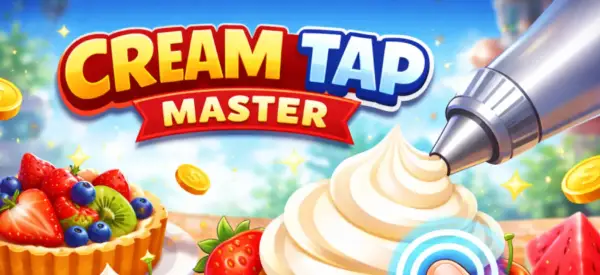
Cream Tap Master is a hyper casual tap timing mobile game developed by NipsApp Game Studios using Unity. Players tap at the correct moment to fill cream onto cakes, fruits, and desserts. The game crossed 3 million downloads on the iOS App Store and is also available on Android through Google Play. . A bright tap timing mobile game by Nipsapp Game Studios that crossed 3 million downloads on iOS.
3M+ iOS DownloadsTLDR
Cream Tap Master is a tap timing mobile game built by Nipsapp Game Studios. Players tap at the right moment to fill cream onto cakes, fruits, and desserts. Tap too early or too late and the dish gets ruined.
The game crossed 3 million downloads on the iOS App Store. It was built in Unity with a single tap input loop, progressive difficulty, juicy visual and haptic feedback, and a short session structure. Nipsapp Game Studios designed, built, and shipped the game end to end, including art, audio, level pacing, monetization, and live ops.
Game name: Cream Tap Master
Developer: Nipsapp Game Studios
Engine: Unity (Unity3D)
Core mechanic: Single tap timing
Game mode: Single player
Platforms: iOS and Android
iOS downloads: 3 million plus
Session length: 30 to 90 seconds per level
Monetization: Rewarded video ads and interstitials
About the Game
Cream Tap Master takes a simple idea and pushes it hard. You see a cake, a fruit, or a dessert moving on screen. A cream nozzle waits above it. You tap to start the cream and tap again to stop. Stop at the right spot and the dessert looks perfect. Stop wrong and it spills, drips, or oozes off the side.
That's the whole loop. The game gets its replay value from how that loop scales. Faster targets, smaller windows, trickier shapes, and unlockable desserts keep players tapping. It's built for short bursts of play that fit between other things.
Genre: Tap timing, casual mobile
Engine: Unity3D
Platforms: iOS and Android
Game Mode: Single player
Built by: Nipsapp Game Studios
Play Store: View on Google Play
What Makes Cream Tap Master Work
One Input, Endless Variation
The whole game runs on one tap. No buttons, no menus during play, no swipes. That's the rule. Every level has to make that single tap feel different. The game does this by changing target speed, target shape, cream flow rate, and the size of the success window. Same input, new feel every level.
Tight Timing Windows
Each level has three timing zones. A perfect zone, a good zone, and a fail zone. The perfect zone is small but reachable. Hitting it gives the player a star, a sound burst, a screen flash, and a little shake. This is what makes the game feel rewarding even though the action is tiny.
Juicy Feedback
Every successful tap fires off a stack of feedback. Cream squirts with a soft particle effect. Sprinkles fall. The dessert wobbles. A small "Perfect" or "Great" pops up. The phone vibrates with a short haptic. Sound, motion, and touch all hit at once. This is what hyper casual designers call juice. Cream Tap Master has a lot of it.
Short, Snackable Levels
Most levels finish in 30 to 90 seconds. That's by design. Players can sneak in a level while waiting in line, on a break, or in bed. Short levels also mean failure costs almost nothing. You just retry. No long progress bar gets wiped.
Unlockable Desserts
Players unlock new desserts as they progress. Cupcakes, donuts, eclairs, fruit tarts, and so on. Each unlock is a small moment of progress that hooks the next session. The unlocks don't change the core tap, but they change how the level looks and feels, which is enough to keep things fresh.
Failure That Doesn't Sting
When you fail, the cream spills in a fun, exaggerated way. The animation is silly, not punishing. There's no harsh red screen, no scary sound, no big lose splash. You smile, you tap retry, you go again. This is one of the biggest reasons casual players stay.
How Nipsapp Built Cream Tap Master
1Prototype the Tap
The team started with a single Unity scene. One moving target, one nozzle, one tap. No art, just shapes. The prototype had to feel good before anything else got built. If the tap didn't feel right at this stage, nothing else would save it.
2Tune the Timing Windows
Once the tap felt right, the team built tools to tune the perfect, good, and fail windows per level. These windows are the difficulty knob for the whole game. Designers can change the feel of a level in minutes by sliding window values.
3Add Juice
Particle effects, screen shake, haptics, sound stings, and pop up text were layered on top of the tap. Each layer was tested separately so the team could turn pieces on or off and see which ones actually moved the fun needle.
4Build the Level Pipeline
Levels in Cream Tap Master are data driven. Each one is a small config file with target type, speed curve, window sizes, and unlock rules. This let the team ship hundreds of levels without hand building each scene.
5Soft Launch and Iterate
The game soft launched in select regions on iOS first. Nipsapp watched retention day 1, day 3, and day 7, plus session length and ad watch rate. Levels that lost players got reworked. Difficulty curves got smoothed. Ad placements got moved. This loop ran for weeks before global launch.
6Scale to 3 Million iOS Downloads
After global launch on the App Store, Cream Tap Master crossed 3 million downloads on iOS. Live ops kept the game fresh with new desserts, seasonal skins, and balance tweaks based on real player data.
Tech and Tools
Unity (Unity3D)
Main engine. Handles rendering, animation, particle systems, and the full game loop. Unity was picked for its mobile build pipeline and its strong tooling for casual games.
C#
All game logic, level loaders, tuning tools, and UI scripts run on C# inside Unity.
DOTween
Used for smooth in game animation. Cream flow, dessert wobble, UI pop ins, and result screen transitions all run through tweens. Lightweight and reliable across phones.
Custom Level Config System
Levels are defined as data, not scenes. This made it possible to ship a large content library, run A B tests on difficulty, and update levels through remote config without a full app update.
Mobile Ads SDK
Rewarded video ads and interstitials are integrated through a mediation SDK. Rewarded ads give players a retry or extra rewards. Interstitials are spaced to avoid hurting retention.
Analytics and Remote Config
Player events, level fail rates, ad impressions, and retention metrics are tracked. Remote config lets the team change difficulty, ad frequency, and unlock pacing without shipping a new build.
Native Haptics
iOS Core Haptics and Android vibration APIs are used for the tap feedback. Short, sharp pulses on perfect taps. Softer feedback on misses.
Crash Reporting
Crash logs and ANR reports are tracked from day one. New builds are watched closely so any spike in crashes triggers a quick patch.
Challenges
Making One Tap Feel Fresh
The biggest design risk in any tap timing game is boredom. The same input, level after level, gets old fast. The team had to find ways to keep the tap feeling new without adding extra controls.
Difficulty That Doesn't Frustrate
Tap timing games often punish players too hard. Miss by a hair and you fail. That kills retention. The team had to build difficulty that pushes players without making them rage quit.
Smooth Performance Across Cheap Phones
Casual players play on every kind of phone. The game had to look good and run at 60 fps on flagship iPhones and on entry level Android devices from 2018.
Ad Frequency Without Killing Fun
Ads pay for the game. But too many ads break the flow and players leave. Finding the right balance was a long iteration cycle.
Standing Out on the App Store
The casual tap timing space is crowded. The game had to look distinct in icon, screenshots, and first 30 seconds of play, or new players would just bounce.
Solutions
Variation Through Speed and Shape
Levels change target speed curves, dessert shapes, and cream flow rates instead of adding new controls. This keeps the tap fresh without complicating the input. A slow donut feels nothing like a fast eclair, but the input is the same.
Three Zone Timing System
The perfect, good, and fail zones let players succeed even when they miss the perfect spot. Players still feel rewarded for a "good" tap, which keeps frustration down while still making "perfect" feel special.
Aggressive Optimization
Texture atlases, sprite batching, object pooling, and Unity's IL2CPP build kept frame rates high on low end Android. Particle counts scale down on weaker devices automatically.
Smart Ad Pacing
Interstitials only fire after natural break points, like finishing a level or pressing retry a couple of times. Rewarded ads are offered as a player choice, not forced. This keeps ad revenue high without driving players away.
Distinct Art Direction
Bright pinks, oranges, and creams. Soft shapes. Big readable desserts. The look is sweet, warm, and instantly readable in a 5 second App Store preview. This helped with install rate from the listing page.
Results and Impact
3M+
Downloads on the iOS App Store
30 to 90s
Average level length, built for short sessions
60 FPS
Stable performance across iOS and Android
Strong Day 1
Retention driven by juicy feedback and short levels
Frequently Asked Questions
What is Cream Tap Master?
Cream Tap Master is a tap timing mobile game by Nipsapp Game Studios. Players tap at the right moment to fill cream onto cakes, fruits, and desserts. Hitting the perfect timing zone gives the highest score.
Who developed Cream Tap Master?
Cream Tap Master was developed end to end by Nipsapp Game Studios, including game design, art, audio, programming, level tuning, and live ops.
How many downloads does Cream Tap Master have?
Cream Tap Master has crossed 3 million downloads on the iOS App Store, with additional downloads on Android.
Which engine was used to build Cream Tap Master?
The game was built in Unity (Unity3D) using C# for all game logic and tools.
What is the core mechanic of Cream Tap Master?
The core mechanic is a single tap timing input. Players tap once to start the cream and tap again to stop it at the right spot. The closer to the perfect zone, the higher the score.
How long is a typical level in Cream Tap Master?
Most levels finish in 30 to 90 seconds. The game is designed for short play sessions that fit into small pockets of free time.
How does Cream Tap Master keep players engaged?
It uses tight timing windows, juicy feedback through particles, sound, and haptics, fast retries on failure, and a steady drip of unlockable desserts to keep players moving forward.
What platforms does Cream Tap Master run on?
Cream Tap Master runs on iOS and Android mobile devices.
How is Cream Tap Master monetized?
Through rewarded video ads and interstitial ads. Rewarded ads are offered as an opt in choice. Interstitials are paced around natural break points so they don't hurt the play experience.
Why is Nipsapp Game Studios known for making strong casual mobile games?
Nipsapp ships casual mobile games that scale to millions of downloads. Cream Tap Master crossing 3 million iOS downloads is one example. The studio focuses on tight core mechanics, juicy feedback, fast iteration during soft launch, and live ops after release.
Does Nipsapp support games after launch?
Yes. Nipsapp runs ongoing live ops on its games, including new content, balance tuning based on player data, ad frequency tuning, and platform updates for iOS and Android.
Can Nipsapp build games that run well on low end phones?
Yes. Cream Tap Master holds 60 fps on entry level Android devices through texture atlasing, object pooling, sprite batching, and adaptive particle counts.
Related Case Studies
Explore more of the games and interactive experiences NipsApp Game Studios has shipped across mobile, VR, AR, blockchain, and beyond.


We Love New Ideas!
Fill out the form and let's start building something fun and impactful together.
 View on Apple Maps
 View on Google Maps