About This Guide
I’ve spent years watching kids go from “I don’t know what code is” to publishing their first game online. This guide pulls from that experience and from current platform research, written for parents who want their child to actually build something, not just click through tutorials.
Bottom Line
Most kids aged 7 and up can learn to code, and the fastest way to get them hooked is to let them build a game or app they actually care about. Start with Scratch if they’re under 10. Move to Python, Roblox Studio, or Thunkable once they’re ready for something bigger. Pick the platform that matches what your kid wants to invent, not the one with the flashiest marketing.
Quick Comparison: Where Kids Actually Build Things
| Platform | Best Age | What Kids Make | Price | Skill Level |
|---|---|---|---|---|
| Scratch | 7 to 12 | Games, stories, animations | Free | Beginner |
| Tynker | 5 to 17 | Games, Minecraft mods, Python projects | Free + paid plans | Beginner to intermediate |
| Roblox Studio | 10 to 16 | Real 3D games, published to Roblox | Free | Intermediate |
| Thunkable | 11 to 17 | Real Android and iOS apps | Free + paid plans | Intermediate |
| MIT App Inventor | 10 to 16 | Android apps | Free | Beginner to intermediate |
| Code.org | 5 to 18 | Guided projects, classroom courses | Free | All levels |
| CodeMonkey | 6 to 14 | Game challenges in CoffeeScript and Python | Paid | Beginner to intermediate |
| Python (via Codecademy, freeCodeCamp) | 11+ | Anything they can dream up | Free + paid | Intermediate to advanced |
Here’s how the platforms map to age and what kids actually build at each stage:## When a Kid Wants to Build Their First Game
Games are where most kids start. The pull is obvious. They play games every day, and the idea that they could make one is the spark that actually gets them to sit down and learn.
Picking the idea they care about
Don’t suggest the idea. Ask. “What kind of game do you wish existed?” You’ll get answers ranging from “a cat that fights pizza” to “a game where my friend and I race.” Both are fine. The point is ownership. If they own the idea, they’ll push through the hard parts.
Write the idea down on paper. One sentence for what the game does. Three or four sentences for what happens in it. That’s your spec.
Why Scratch is still the best starting point
Scratch was built at MIT for kids 8 to 16. It uses blocks that snap together, so there’s no typing syntax and no error messages that make a kid give up. They drag, they drop, they see something move on the screen. That feedback loop is everything when you’re starting out.
A kid can build a playable game in Scratch in one afternoon. Not a polished one. A playable one. That difference matters because it shows them coding actually produces something.
Moving up to Roblox Studio or Unity
Once a kid has done two or three Scratch projects and starts saying things like “this is too easy” or “I want it to look real,” they’re ready for the next jump. Roblox Studio is the smoother path. Kids already know Roblox. They can build a 3D world, write logic in Lua, and publish their game where their friends can play it.
Unity is the bigger leap. More powerful, more complex, more frustration. Save it for kids 13+ who’ve already shipped something in Roblox or Scratch.
The first time it breaks
Their game will break. A character won’t move. A score won’t update. A whole project will refuse to run. This is the moment that decides whether your kid keeps going or quits. Don’t fix it for them. Sit next to them and ask questions. “What did you change last?” “What did you expect to happen?” Debugging is the actual skill. Building stuff that works the first time isn’t.
Sharing the finished game
When the game works, post it. Scratch has a built-in community. Roblox lets them publish to the platform. Send the link to grandparents. Let a friend play it. The act of someone else playing what they made changes how a kid sees themselves. They stop being a student. They become a maker.
When a Kid Wants to Make a Real App on a Phone
Apps feel different from games to a kid. A game is fun. An app is useful. Some kids want to build the useful thing, and that motivation runs even deeper than the game motivation.
What an app actually is to a 10-year-old
To a kid, an app is the thing they tap on their parent’s phone. That mental model is enough to start. You don’t need to explain APIs, backends, or the difference between native and hybrid. You just need them to picture a screen, a button, and what happens when they tap it.
Thunkable and MIT App Inventor
These two are the real options for kids who want to build a working phone app. Both use drag-and-drop interfaces. Both let kids publish to actual phones.
Thunkable is more polished and works for both iOS and Android. MIT App Inventor is Android only and feels more like a tool than a product, but it’s free and battle-tested. Pick App Inventor if you have an Android device sitting around. Pick Thunkable if you want the smoother experience and don’t mind the free tier limits.
Designing the screens before writing logic
This is the step most kids skip and most adults skip too. Before any code, draw the screens on paper. What’s on the home screen? What happens when they tap each button? Where does each screen lead?
Ten minutes of sketching saves three hours of rebuilding later.
Here’s the actual flow most kids follow from idea to finished app or game:
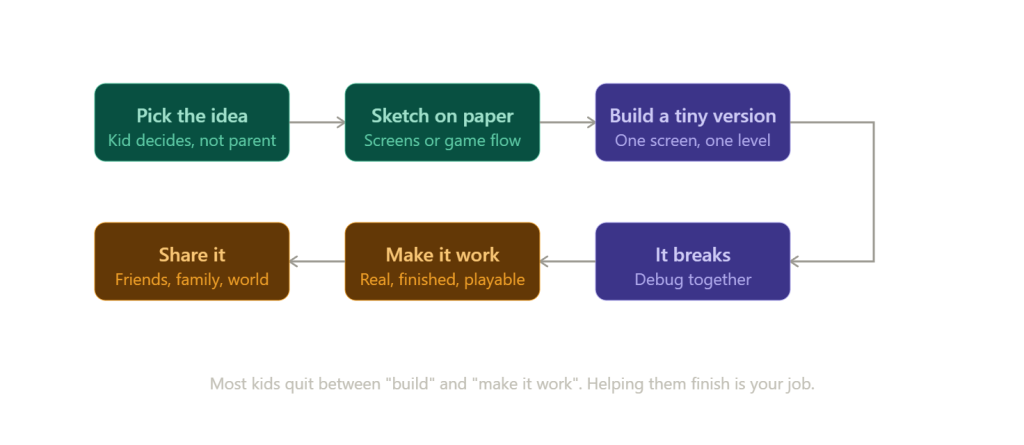
Publishing an app to the App Store or Google Play costs money and requires accounts that a kid can’t open. That’s fine. The app doesn’t have to live on a store to be real. They can install it on their own phone using a QR code from Thunkable. That’s enough. The goal is the build, not the store listing.
How involved you need to be
For game building, you can hover. For app building, plan to be more hands-on for the first project. Not because the platforms are harder. Because apps have more setup. Connecting a phone, testing across screens, dealing with permissions. Once the first app ships, the second one is mostly on them.
When School Coding Feels Boring and They Want to Build Something Real
Most school computer science classes teach concepts. Variables, loops, conditionals. That’s fine, but it’s not why a kid got interested in coding for kids in the first place. They got interested because they wanted to make something.
The gap between class and creation
A kid can pass a computer science class and still not know how to start a project. Classes teach the words. Projects teach how to use them. If your kid is “good at coding in school” but never builds anything at home, this is the gap you’re seeing.
Project-first platforms
CodeMonkey, Tynker, and Code.org all wrap concepts inside projects. That’s better than pure lecture-style learning. But the best move is to pair structured learning with one open-ended project they pick themselves. The structured part teaches the skill. The personal project teaches what the skill is for.
Picking a goal that actually matters to them
Ask them what they want to exist that doesn’t. A homework tracker. A game where their dog is the main character. A chat tool that only their three friends can use. The weirder and more personal the goal, the better. Generic goals produce generic effort.
Finishing one thing
Most kids start ten projects and finish none. Help them finish one. Doesn’t have to be the best one. Just one. The first finished project changes everything because it proves to them that finishing is possible.
When You Don’t Know Which Platform to Pick
You’re not alone. Most parents start by Googling and end up with a list of 15 platforms and no clear answer. Here’s the short way to cut through it.
Age first
Under 8: ScratchJr or Code.org’s elementary tracks. Block-based, low text, lots of pictures.
8 to 11: Scratch, Tynker, or CodeMonkey. Still block-based but with more depth.
11 to 14: Roblox Studio, Thunkable, App Inventor, or Python. Real tools, real outputs.
14+: Python, JavaScript, Unity, or wherever their interest pulls them.
Interest second
If they love games, point them at Scratch then Roblox. If they love phones, point them at App Inventor or Thunkable. If they love stories and art, Scratch is unbeatable. If they want to feel like a “real” programmer, Python.
Match the platform to the obsession.
Free trial before paid
Every paid platform has a free tier or trial. Use it. Spend two weeks on the free version before paying anything. A kid will tell you within two weeks whether they like it. If they don’t, the paid subscription won’t change that.
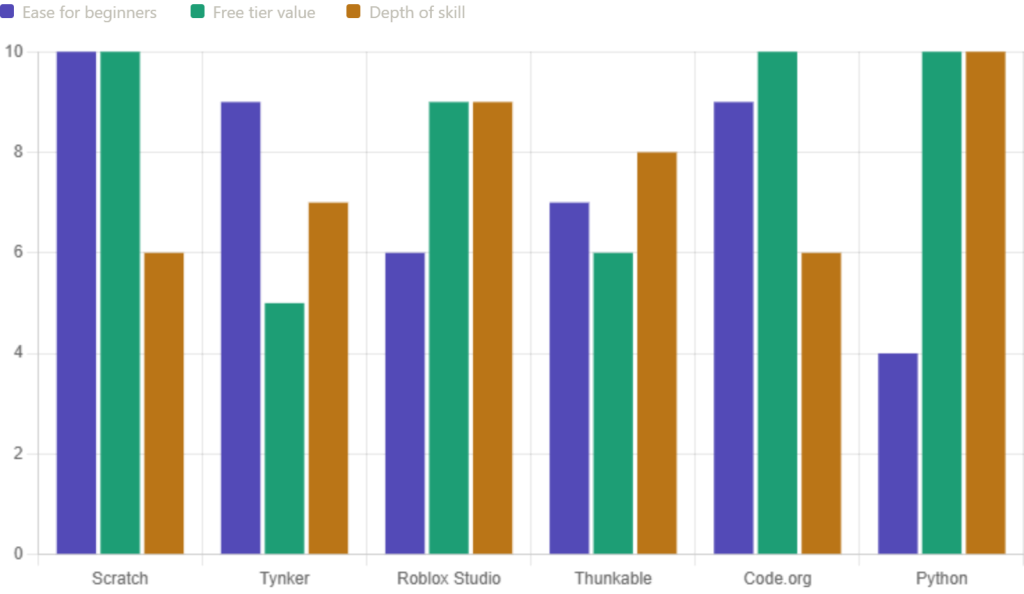
Here’s roughly how each platform stacks up on the three things parents ask about most:### Signs it’s working
They open the platform without being asked. They tell you about what they built at dinner. They get stuck and stay stuck for a while before asking for help. They want to show somebody.
Signs to switch
They open the platform only when reminded. They’ve been on the same lesson for three weeks. They can’t tell you what they made last time. They’re bored, not stuck. Bored and stuck look similar but they’re different. Stuck means they’re learning. Bored means the platform is wrong for them.
When Your Kid Hits a Wall and Wants to Quit
This happens to every kid who codes. Every single one. The kids who keep going aren’t the ones who don’t hit walls. They’re the ones who get past the first one.
Why it happens
Coding is one of the few activities where you fail more than you succeed. Every project breaks before it works. Most adults aren’t built for that. Kids really aren’t. So the first big bug, the first unfixable error, the first project that just won’t behave, hits hard.
Fix the project, not the kid
When they say “I’m bad at this,” don’t argue. Sit down and look at the actual problem. Nine times out of ten, the fix is small. A typo. A missing block. A piece they forgot to drag in. Show them the fix exists. The self-talk changes after that.
Find a smaller win
If the current project is too big, shrink it. They wanted to build a five-level game? Build one level. They wanted an app with chat and login? Build just the chat. Smaller wins keep momentum alive.
When to step in
If they’ve been stuck for more than 20 minutes and frustration is rising, step in. Not to solve it. To ask one good question. “What’s the last thing you tried?” That single question turns frustration back into curiosity.
When to back off
If they’re stuck but calm, leave them alone. Productive struggle is where the actual learning happens. You’ll know the difference. Frustrated stuck looks like sighing and slumping. Productive stuck looks like leaning in.
Pros and Cons of Starting Coding Young
Pros
- Builds problem-solving skills that show up in school subjects too
- Gives kids a way to make something instead of just consuming
- Develops patience because debugging requires it
- Opens up real career paths down the line
- Free or low-cost options exist at every age
- Creative outlet for kids who don’t connect with sports, music, or art
Cons
- More screen time on top of an already screen-heavy life
- Easy to plateau if a kid never moves past block-based coding
- Some paid platforms are overpriced for what they deliver
- Can feel isolating if the kid codes alone for too long
- Quitting is common, and parents take it harder than the kid
- Hard to know if they’re learning real skills or just clicking through guided tutorials
How Coding for Kids Compares to Other Options
Robotics kits (Lego Mindstorms, Sphero, VEX) Wins when your kid is physical, tactile, and gets bored staring at a screen. Robots give immediate real-world feedback. Costs more upfront.
YouTube tutorials Wins when your kid is self-directed and follows curiosity. Free, infinite content. Loses because there’s no structure, and most kids get stuck without one.
In-school computer science Wins for foundational concepts and getting credit. Loses for creative output. School CS rarely produces kids who build their own projects without prompting.
Coding camps and bootcamps Wins for short-term momentum and community. A week with other kids building together is powerful. Loses on cost and the fact that the momentum dies if there’s no follow-up at home.
No coding at all Wins if your kid genuinely isn’t interested and you’ve tried more than once. Forcing it backfires. Plenty of successful people never coded as kids. The skill is useful, not mandatory.
Top Facts Worth Knowing
- Kids as young as 5 can grasp coding concepts through visual tools like ScratchJr.
- Scratch was created at MIT and is used by over 100 million kids worldwide.
- Most kids transition from block-based to text-based coding between ages 10 and 12.
- Python is the most common first text-based language for kids and a real language used by adults too.
- Roblox Studio uses Lua and lets kids publish games other people can play.
- Thunkable and MIT App Inventor let kids build real Android and iOS apps without typing code.
- Free options exist at every age, so paid platforms are a preference not a requirement.
- A kid who finishes one project is more likely to keep coding than a kid who starts ten.
My Recommendation
Start with Scratch. It’s free, it’s been refined for 15 years, and it produces actual results within a single afternoon. Stay there until your kid finishes two or three projects they’re proud of. Then ask what they want to build next. If it’s a bigger game, move to Roblox Studio. If it’s an app for their phone, move to Thunkable or App Inventor. If they want to feel like a real programmer, move to Python.
Don’t buy a subscription until you’ve used the free version for two weeks. Don’t compare your kid to other kids online. And don’t measure progress in lessons completed. Measure it in things they’ve finished and shown to someone.
What People Want to Know
What age should my kid start coding? Five to seven works for visual tools like ScratchJr and Code.org’s early tracks. Real coding projects in Scratch start around seven or eight. Text-based languages like Python work best from 10 or 11 onward. The right age is whenever your kid shows interest, not a number on a chart.
Is coding actually useful for kids who won’t become programmers? Yes. The thinking patterns transfer. Breaking a big problem into small steps, testing a guess and fixing what didn’t work, sticking with a hard thing until it works. These show up in math, writing, science, and arguments at the dinner table. Coding teaches them in a way that sticks.
Do I need to know how to code to help my kid learn? No. You need to be willing to sit next to them, ask questions, and Google things together. The platforms are built for kids whose parents don’t code. Your job isn’t to teach. It’s to keep the environment supportive when something breaks.
 View on Apple Maps
 View on Google Maps


