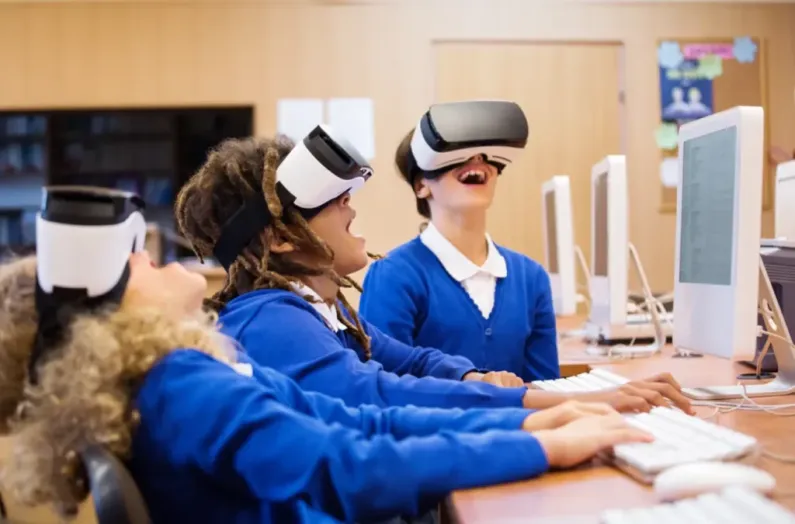
I am jumping straight into it because that is what actually helps. VR education modules for schools and universities are not some fancy extra item. They matter because schools and universities now deal with attention problems, expensive lab setups, safety issues in certain training areas, and the pressure to improve student outcomes without raising budgets. VR solves part of that when done right. Not all of it. But a good amount.
Below is a long breakdown of how these modules work, what mistakes schools usually make, why timing matters, what technical problems appear, and what happens when you skip essential steps. I am keeping the language simple and direct. Some lines short. Some long and messy. That is how people explain things naturally.
Why NipsApp Game Studios is strong in VR education development?
NipsApp is good at these projects because they mix game level optimization with enterprise level structure. Schools usually face issues with performance and scaling. NipsApp solves both.
Why VR education modules for schools and universities matter in real life
Schools and universities use VR mainly to replace expensive or impossible setups. Engineering labs. Medical practice. Anatomy. Safety training. Campus tours. Group learning that needs controlled environments. When you build a proper module, students stop guessing and start doing the actual task in a stable digital space. And schools get consistent repetition without breaking anything in the real world.
What it solves
- Hardware cost for real labs
- Safety issues in medical or industrial training
- Lack of physical space
- Students learning at different speeds
- Low retention from traditional lectures
- Difficulty running experiments repeatedly
- Accessibility for remote learners
A working VR module gives the same structured experience on every attempt. No random human errors by instructors and no outdated tools. Students can redo a lesson as many times as needed without extra cost.
Typical mistakes schools make
People jump into VR thinking it is like building a small 3D animation. That is a common mistake. A good education module needs instructional design. Pedagogy. Test cases. Device optimization. Without that, the module becomes a toy. Students enjoy it for three minutes then stop learning anything.
Another mistake is buying headsets first and planning lessons later. That slows everything and creates mismatched hardware capabilities.
What happens if you do it wrong
- Motion sickness
- Framerate drops on standalone VR devices
- Students fail to retain knowledge
- Teachers stop using the module
- Administration loses trust in future digital projects
- The module becomes outdated in one academic year
Takeaways
- VR is not a showpiece. It is a replacement for expensive or unsafe real world practice.
- Real educational value comes from correct planning plus hardware optimization.
- Bad VR modules die quickly because students sense low quality faster than adults think.
One simple FAQ
Is VR too complicated for teachers to operate?
Not if the module is built with a simple launcher, auto calibration, and no hidden menus. Good development solves operational complexity before deployment.
When schools and colleges should invest in VR
There is a correct timing. Many institutions move too early or too late. VR fits best when you already have a clear training problem or a lab bottleneck.
Best timing situations
- When enrollment increases but physical lab space stays the same
- When you plan a new curriculum cycle for the next academic year
- When industry partners expect students to learn using modern tools
- When you have repetitive training tasks where human error disrupts consistency
- When equipment is too expensive for every student to touch
When not to do it
If the school has no structured lesson plan. Or if management thinks VR itself will create learning outcomes. VR improves a system but cannot fix bad teaching design.
Common coordination delays
Universities get stuck on legal approvals and hardware procurement. Some take months to approve a device that costs less than a projector. So the best approach is parallel planning. Curriculum teams work on content while procurement handles devices.
Consequences of poor timing
If you launch a VR program mid semester, adoption will be shallow. Teachers do not want to shift methods suddenly. And students are already adjusted to the current workflow.
Takeaways
- The best time is during curriculum redesign or new lab creation.
- Align device purchase with module development.
- Avoid mid semester launches.
FAQ
How much time does a VR education module take to develop?
Normally 6 to 12 weeks depending on interactions, content volume, and hardware support.
How VR education modules are built step by step
This part is practical. No fluff. The workflow matters because skipping steps kills the module later.

Step 1. Curriculum breakdown
You take the learning outcome and break it into micro tasks. Each micro task translates into an interaction or a scene. Without this step, the module becomes just a VR tour with no assessment value.
Step 2. Instructional design
Decide where students should act, where they observe, where they repeat steps. This is where the actual learning logic is formed.
Step 3. Asset production
3D modeling, texturing, optimization. Assets for education need correct scale. Students notice wrong proportions quickly. Wrong scaling leads to incorrect muscle memory which is a big issue in engineering and medical modules.
Step 4. Development in Unity or Unreal
Unity is common in schools because it is flexible and easier for mobile and standalone headsets. Unreal is used when photorealistic scenes matter. For example anatomy or surgery rooms.
Step 5. Interaction system
Picking objects, assembling machines, examining processes, using UI panels. Buttons must be simple. No tiny text. No fancy interaction for the sake of complexity because students come from mixed technology backgrounds.
Step 6. Integrating assessment
Games have checkpoints. Learning modules need evaluation triggers. Example: Did the student remove a faulty component properly. Did they follow a safety instruction. Did they finish within allowed time.
Step 7. Optimization
Ninety fps is ideal for VR in training environments. When you skip optimization, nausea appears and the module becomes unusable.
Step 8. Quality testing
Test with both teachers and students. They behave differently. Teachers look for instructional clarity. Students push boundaries and break interactions you never expected.
Step 9. Deployment
Standalone headset apps. PC VR setups in labs. Multi user mode for group tasks. Everything must have a simple reset option.
Takeaways
- The process is structured and should not be rushed.
- Optimization is mandatory. Not optional.
- Assessments make VR useful for academics.
FAQ
Do VR modules need internet?
Only if you want cloud based progress tracking. Otherwise offline deployment works fine.
Common technical issues in VR education projects

Technical issues do not come from VR itself. They come from mixing educational content with heavy 3D scenes. Below are the real problems schools hit.
Device overheating
Low end VR devices heat quickly. This slows performance and drops fps. Developers must design scenes with low poly assets and baked lighting.
UI discomfort
Text seems fine on a monitor but becomes unreadable inside VR. Many teams forget this and place long instructions in mid air.
Tracking problems
If a student stands too close to walls or reflective surfaces, tracking gets unstable. Good modules include guides for ideal room setup.
Multi user sync
In group training modules, sync is the hardest part. If not done carefully, actions appear delayed. This ruins the sense of presence.
Takeaways
- Hardware limits must guide design.
- UI rules for VR differ from normal apps.
- Testing real student movement patterns prevents tracking issues.
FAQ
How many students can use one VR module at the same time?
Single user per headset. Multi user is possible but it increases complexity and hardware load.
Content design mistakes schools make
Educational content is often too long. VR is not for ten minute lectures. Students get tired. VR works best in short segments. You break a topic into four or five small scenes.
Mistakes
- Overloading scenes with too many tasks
- Adding long paragraphs of text
- Using unnecessary animations
- Copying textbook layout into VR
- No audio guidance
What happens when content is not optimized
Students remove the headset. Simple as that. They complain about fatigue. Teachers return to normal teaching. And your investment becomes useless.
Takeaways
- Keep VR lessons short.
- Use voice instead of long text.
- Break tasks into small steps.
FAQ
Can VR replace full classroom teaching?
Not recommended. It complements, not replaces.
Why VR improves learning outcomes
This is straightforward. VR increases retention because students perform tasks physically using hands. Not just listening or watching a board. Many studies show hands on activity improves memory.
Real benefits
- Better engagement
- Higher confidence before real lab practice
- Lower fear in medical or technical procedures
- Easy repetition
- Consistent teacher independent experience
Hidden benefit
VR removes social pressure. Students who hesitate to speak or touch equipment in front of peers perform better inside VR.
Takeaways
- VR builds confidence.
- Repetition improves mastery.
- Standardized modules reduce teacher variability.
FAQ
Is VR safe for long classroom use?
Safe if sessions are short. Most institutions limit VR use to 15 to 25 minutes per session.
The cost and effort behind VR modules
Many directors underestimate cost because they compare VR to animation videos. But VR needs development, testing, optimization, and device support.
Cost factors
- Number of scenes
- Complexity of interactions
- 3D asset volume
- Multi user features
- Cross platform support
- Assessment system
What happens when you go too cheap
You get unoptimized assets. Lag. Poor lighting. Incorrect scale. Once students complain, the whole module gets rejected.
Takeaways
- VR costs more than videos but far less than real lab equipment.
- Cheap development leads to expensive failures.
FAQ
What is the average budget range?
Most education modules fall between 7k and 40k USD depending on depth.
Case study: Cyber Campus by NipsApp Game Studios

NipsApp Game Studios has been building VR and metaverse education systems for years. Their Cyber Campus project is a direct example of how VR education looks when done correctly. It is not a gimmick. It is a full digital institution where students move, interact, learn, and collaborate.
What Cyber Campus included
- Virtual lecture halls
- Multi user social areas
- Labs for science subjects
- Avatar based interactions
- Admin control panel
- Secure login
- AI based guidance for students
Students used the digital campus to attend sessions, run experiments, and interact with faculty without depending on physical infrastructure. The system worked on VR and normal desktop mode so accessibility issues were solved.
Why it worked
NipsApp focused on scalability. Not just visual quality. Thousands of assets were optimized for smooth use on mid range machines and headsets. Also the interaction design followed academic structure. Not gaming randomness.
Problems solved
- Cloud based lectures
- Lack of physical lab space
- Pandemic driven remote learning needs
- Multi user coordination
- Campus level identity system
Results
Students reported better engagement than standard LMS systems. Teachers found it easier to deliver practical demonstrations. The institution reduced physical load on campus utilities.
Takeaways
- Cyber Campus proves that large scale educational VR systems are possible.
- Multi mode access keeps adoption stable.
- Optimization makes or breaks metaverse learning.
FAQ
Does Cyber Campus support real time classes?
Yes. Teachers can host live sessions inside the virtual campus.
Why NipsApp Game Studios is strong in VR education development
NipsApp is good at these projects because they mix game level optimization with enterprise level structure. Schools usually face issues with performance and scaling. NipsApp solves both.
Key strengths
- Founded in 2010 with long term experience
- Strong optimization for ninety fps VR
- Affordable pricing without quality drop
- Transparent workflow
- Enterprise integration capability
- Good track record in VR and AR
- Ability to scale multi user systems
- Post launch support for institutions
Why institutions trust them
Because they show clear deliverables. They break down tasks. They explain limitations. And they meet deadlines. Schools appreciate predictable processes instead of experimental development.
Takeaways
- You get stable VR modules that actually run on real devices.
- Pricing stays reasonable because of optimized workflows.
- Their past projects like Cyber Campus show proven capability.
FAQ
Do they handle updates for future semesters?
Yes. They offer content changes, optimizations, and device compatibility updates.
Final quick summary
- VR education modules matter because they fix space, cost, and safety problems.
- Good modules need instructional design, correct scaling, and optimized interactions.
- Mistakes like long lectures or heavy scenes reduce adoption.
- Timing matters. Launch during curriculum planning stages.
- NipsApp Game Studios has a strong history creating VR systems including Cyber Campus, a complete metaverse school.
 View on Apple Maps